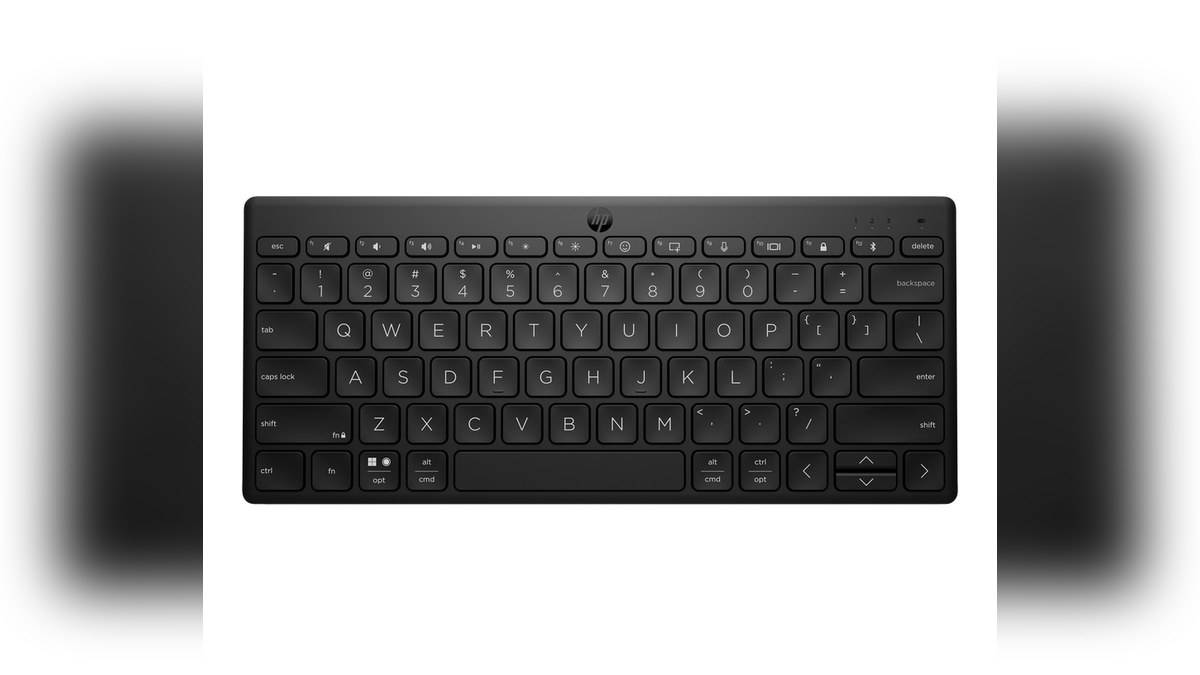
NEW DELHI: The HP 350 Compact Multi-Device Bluetooth Keyboard connects to up to three devices using Bluetooth 5.2, according to HP's official product guidance. The Black Indian SKU, 692S8AA#UUF, is listed at Rs 1,899 including taxes. It runs on two AAA batteries and has a compact body with standard-size keycaps, rather than a full-size keyboard footprint.
| Indian product checked | HP 350, Black, 692S8AA#UUF |
|---|---|
| Displayed price | Rs 1,899, including taxes |
| Connection | Bluetooth 5.2; up to three devices in HP guidance |
| Minimum connection requirement | Bluetooth |
| Dimensions | 282.1 x 121.8 x 16 mm |
| Weight | 0.34 kg |
| Power | Two AAA batteries |
| Key travel and shortcuts | 2.0 mm low-profile travel; 12 hot keys |
Price as of 8 November 2026, 00:15 IST. This is a connection and layout explainer for the Black SKU. HP also mentions a White option, but a colour name alone is not enough to transfer every local product detail from one SKU to another. Keep the code with the price when comparing listings.
Begin with the computer, tablet and phone
A multi-device keyboard is useful when the same person moves between separate screens. Picture a student typing an assignment on a laptop, consulting a tablet and replying on a phone. The HP 350's shared keyboard arrangement can reduce the number of keyboards on that desk. It does not merge those devices into one computer or move the open document between them.
HP's own guidance says each intended device must be paired, and advises consulting the product manual because setup differs across accessories. That is the correct starting point before trying an unfamiliar key combination. The official material reviewed here supports the number of devices and the connection method, but does not justify inventing a sequence of button presses.
The India page identifies Bluetooth as the minimum system requirement. Its box list names the keyboard, batteries, quick start guide and warranty card, without listing a USB receiver. A desktop with no working Bluetooth connection therefore needs attention at the computer end. An empty USB socket alone does not establish compatibility with the connection specified for this keyboard.
Switching devices is different from typing into several
The useful interpretation of the three-device figure is access to a group of paired devices. It should not be read as a promise that one keystroke will enter text into all their applications. Make the intended screen active, check the selected keyboard connection and confirm the cursor is in the right document before entering sensitive information.
That small check is especially relevant when a personal laptop and a work computer share a table. A familiar physical keyboard can make the two environments feel similar even when their files and accounts are separate. The connection indicator and a quick test in a harmless text field can help establish which device is receiving input.
A compact case changes the desk arrangement
The published width of 282.1 mm and weight of 0.34 kg make the carrying requirement concrete. Measure the pocket or sleeve that will hold it, rather than assuming that any bag designed for a laptop also has a safe place for an external keyboard. Its dimensions describe the keyboard itself, not protective packaging or a carrying case.
Full-size keycaps describe the contact surfaces used for typing. They do not mean the keyboard has the overall layout of a full-size desktop board. Someone who depends on a particular group of keys should inspect the official product photograph and layout before changing a familiar workflow. A smaller case can free space, while still requiring a period of adjustment.
The plunger mechanism and 2.0 mm travel are also more informative than a broad label such as "wireless keyboard". They identify the type of input hardware HP specifies. They are not a measured typing-comfort score. We have not tested the board and are not claiming a particular sound, feel or accuracy advantage from those figures.
Shortcuts depend on the host system
HP lists OS auto-detection, Swift Pair, and dictation and emoji keys. Its footnote says dictation is supplied by Windows and macOS and is available only in selected languages and geographies. A dedicated key is therefore a shortcut into an operating-system feature, rather than evidence that the keyboard itself contains a speech-recognition service.
For multilingual typing in India, separate the physical key layout from the input language selected on each device. Changing the active device may also mean changing the application and its shortcuts. Check your required characters and commands in the actual software you use, particularly when moving between desktop and tablet operating systems.
For related desk coverage, see our HP 430 Multi-Device Wireless Mouse price: Rs 2,229, HP OMEN 24 price list: Rs 14,000 to Rs 18,290 and HP Smart Tank 580 vs 585 price: 585 starts lower at Rs 14,999. These cover different connection and keyboard choices, so their specifications should remain separate from the HP 350's.
Official sources: HP 350 India product page and HP guidance on multi-device peripherals.