NEW DELHI: Marshall Woburn III owners connecting the speaker to a television should use the TV's HDMI ARC socket and select PCM, 2-channel audio output. Marshall's own setup instructions specify both settings. Simply connecting an HDMI cable leaves another part of the job to the television's sound menu.
| Check | Official instruction or specification |
|---|---|
| TV connection | HDMI ARC |
| TV audio format | PCM, 2-channel |
| Speaker input selection | HDMI |
| HDMI lead | Not included |
| Other wired inputs | 3.5 mm and RCA |
| Idle standby | After 10 minutes without use |
| Cream model listed price | Rs 46,999 on Marshall India |
Start at the television socket
Connect the lead between the HDMI socket on the back of Woburn III and the television port marked HDMI ARC. Marshall tells users to consult their television manual for its port labelling and HDMI support. That is the useful first check if the set has several similar-looking sockets behind a wall-mounted screen.
Switch on the speaker and press its source button to select HDMI. Then switch on the TV, select HDMI ARC as its audio output and choose PCM with two channels. Check the cable destination and the menu setting together before assuming that a silent speaker needs repair.
For a living room used by several family members, write down the working TV menu choices once the connection is established. Someone changing the audio output while using another device can otherwise leave the next viewer looking for a fault in the speaker. This is a practical setup suggestion, rather than a separate Marshall feature.
Understand the controls you are using
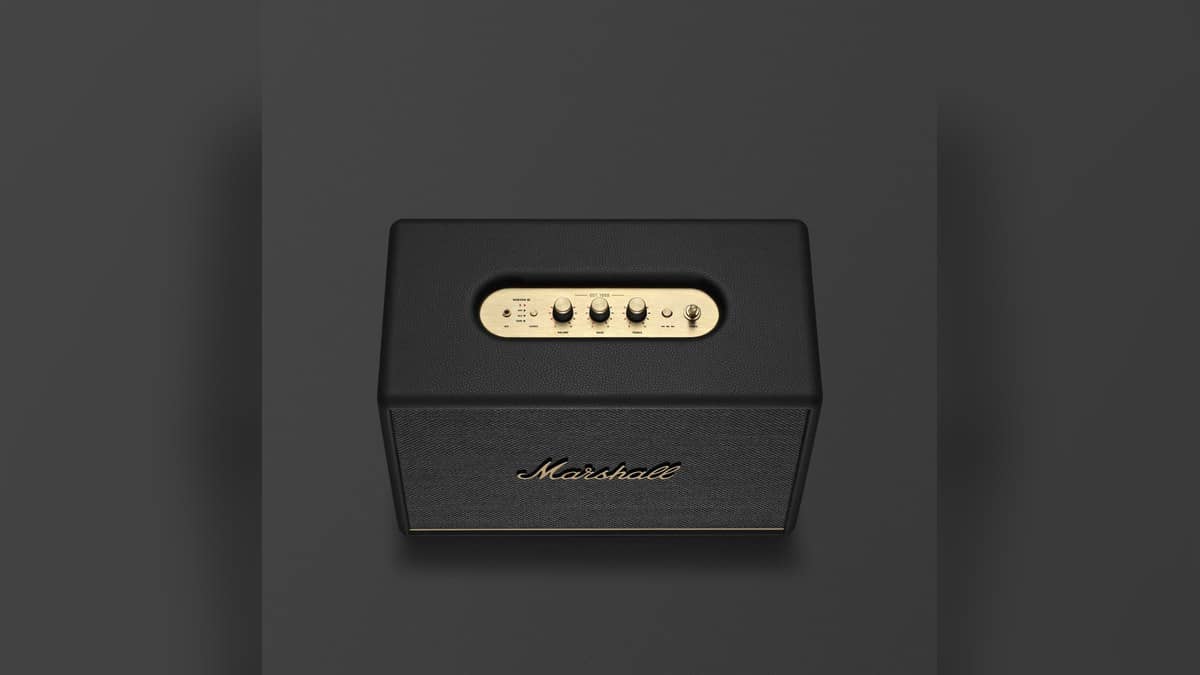
The device layout guide identifies Bluetooth, AUX, RCA and HDMI as selectable sources. A light indicates the current selection, and the Marshall Bluetooth app can also change it. The top panel has separate volume, bass and treble controls. Start with low volume on both the audio device and speaker, as Marshall advises.
Those controls have different jobs. Choosing HDMI establishes which input the speaker listens to; turning up the volume cannot substitute for selecting that input. Likewise, tone adjustments should come after the connection works. Keeping those tasks separate makes an initial setup easier to repeat and gives another household member a clear sequence to follow.
Before moving the cabinet into place, leave access to the source controls and cable connections. A working setup should remain easy to inspect after the television stand has been tidied and the leads are hidden.
If there is no sound
Marshall's troubleshooting page first points to the selected audio source. Check it with the top button or app, confirm that the intended device is connected, and then increase the source or speaker volume slightly if needed. Work through those checks individually so you can identify which change restored playback.
A speaker that has been idle can also need waking. Marshall says Woburn III enters standby after ten minutes without use and disconnects Bluetooth devices. Operating a top control, reconnecting a Bluetooth device or playing audio through a physical input can wake it. An idle-state change is therefore another check before repeating the entire connection process.
Who this arrangement is for
This setup is relevant to someone using the same home speaker for television and music. Woburn III includes HDMI alongside RCA and the smaller analogue input. For a mixed-use cabinet, identify each connected source clearly; a record player session and a television session need the corresponding input selected.
The Cream version was listed at Rs 46,999 on Marshall's India product page. Price as of 1 November 2026, 00:40 IST. That is the selected finish's displayed price, not a verified price list for every colour. This guide addresses existing owners as well as readers checking how the TV connection works.
For related reading, see our Watch and audio price guide, the Marshall Stanmore III vs Acton III price: Acton III starts lower at Rs 20,999 and our JBL Cinema SB595 price: Rs 29,999 for the soundbar package. Each covers a different home-audio decision.
Official sources: Marshall HDMI instructions, device layout, audio troubleshooting, standby guide and India product page.