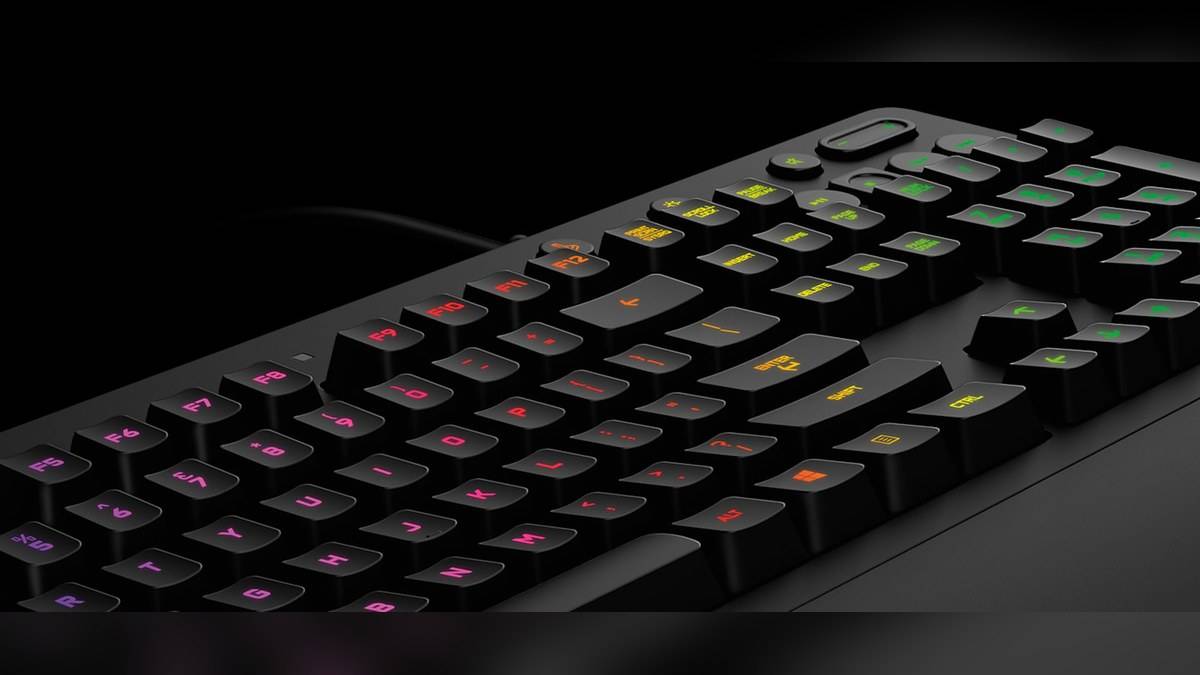
NEW DELHI: The Logitech G213 Prodigy has five lighting zones and a dedicated Game Mode control that disables the Windows key while active. The backlight has its own toggle, so lighting and key blocking are separate functions. Knowing which control is active can explain a missing Windows-key response without immediately treating the keyboard as faulty.
| Item | Official detail |
|---|---|
| RGB lighting | Five individual zones |
| Backlight toggle | Above the PAUSE key, upper right |
| Game Mode | Windows key disabled while active |
| Mech-Dome full travel | 4 mm |
| Actuation force | 50 g |
| Spill-resistance test claim | 60 ml |
| India catalogue reference | Rs 5,295; Price as of 10 November 2026, 23:58 IST |
Start with the control that matches the symptom
Logitech support says pressing the Game Mode key enables that mode and illuminates its indicator. The Windows key is disabled while the mode is active. For backlighting, the support page identifies a separate toggle above PAUSE in the upper-right area, with an indicator that lights when backlighting is enabled.
That creates a useful distinction for a shared home PC. A student may finish a game and leave the keyboard in a different state for someone opening a document. If ordinary typing still works but the Windows key does not, checking the mode is a more focused first observation than changing unrelated computer settings.
The same reasoning applies to a dark keyboard. An unlit key area and a blocked Windows key are different observations. Note which one is happening before changing controls. Altering both settings together makes it harder to tell which setting was responsible for the behaviour being investigated.
This is a control check, rather than a diagnosis of every keyboard fault. A Windows-key problem that remains after the mode is changed needs its own investigation. The existence of a lock feature does not establish that every unresponsive key, cable issue or software problem comes from that feature.
Five zones describe the lighting layout
The product page describes five independently customisable lighting zones, a palette of approximately 16.8 million colours and adjustable brightness. It identifies G HUB for customisation. Five zones means the lighting is organised into groups; the number of available colours should not be read as a count of separately addressable keys.
For someone arranging a gaming corner beside a study area, the useful question is what the light needs to show. A restrained colour arrangement may make the desk easier to use without becoming part of the task itself. A decorative effect does not substitute for a clear understanding of the Game Mode indicator.
Separating illumination from input also helps when explaining the keyboard to another household member. One control changes whether the key area is lit; another changes what happens when a particular system key is pressed. Those functions can be described without requiring the next user to understand the whole customisation application.
Mech-Dome is the switch description to recognise
Logitech calls the G213 switches Mech-Dome and gives a full travel distance of 4 mm with a 50 g actuation force. Its description compares the response profile with a mechanical keyboard. That comparison is a feel claim, while the model itself uses membrane and keyframe construction.
The distinction matters when reading a product listing. A phrase about a mechanical-like response should not silently become a specification for a replaceable mechanical switch. The official terminology is the most reliable way to identify what the G213 actually contains, rather than assuming that every keyboard sold for gaming uses the same construction.
Full travel also measures something different from the point at which an input registers. The 4 mm figure describes the complete key movement stated by Logitech. It does not, on its own, establish a complete computer response time or prove a particular advantage in a game.
What the durability wording establishes
The company states that spill resistance was tested to a 60 ml liquid rating. It also lists an integrated palm rest, adjustable feet and dedicated media controls. The spill figure is a defined test claim; it is not wording that establishes waterproof operation, unrestricted liquid exposure or a particular warranty remedy.
For a desk that also holds schoolwork and refreshments, this is a reason to read the limitation carefully. An accidental spill and a deliberate rinse are very different situations. The product description is not a cleaning procedure, and there is no basis here for inventing one from the resistance rating.
The India catalogue displays Rs 5,295 for the G213 model entry. That reference places the hardware features in a clear price context, but this article concerns how its controls work. The practical takeaway is to identify lighting, Game Mode and key construction separately, then describe the actual symptom before seeking a remedy.
The dedicated media buttons provide another useful boundary when describing a problem. A playback command and a key-lighting command do different jobs. If the concern is whether a video pauses, describe that behaviour specifically rather than saying the keyboard lights or mode are wrong. A precise observation makes the next check easier to choose.
Related reading: ASUS TUF Gaming K3 and K1 comparison; HP OMEN 24 monitor price guide; HP 350 multi-device keyboard explainer.
Official sources: Logitech India keyboard catalogue; Logitech product details; Logitech support instructions.