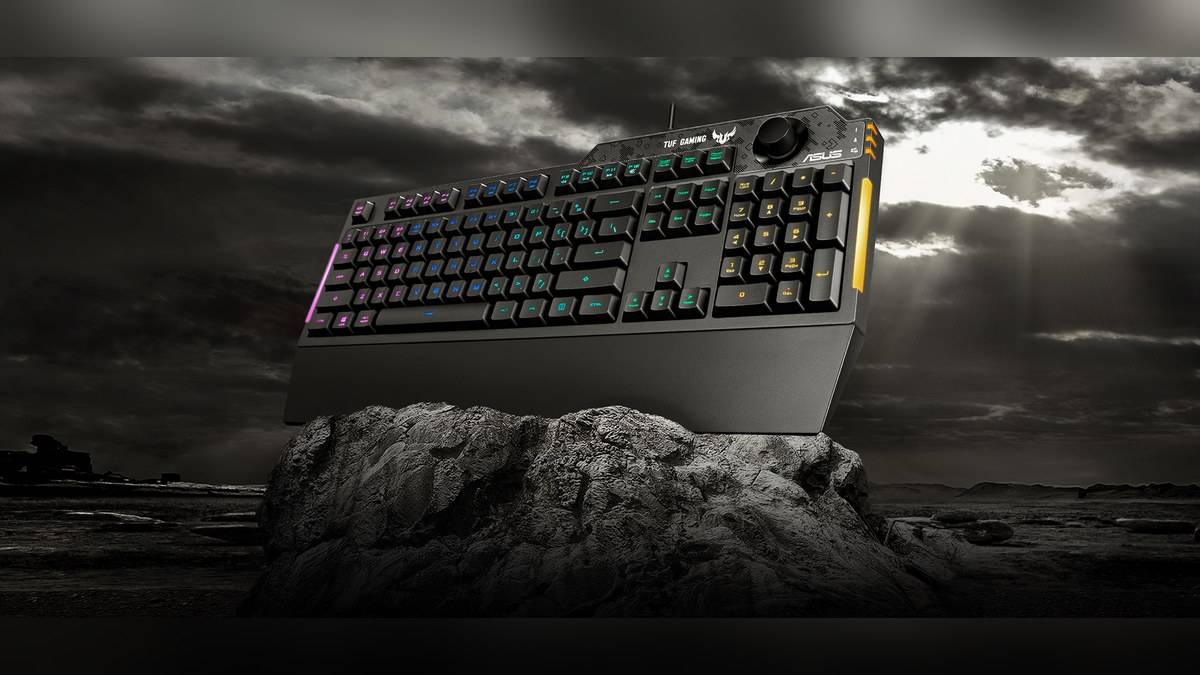
NEW DELHI: The ASUS TUF Gaming K1 is listed at Rs 4,299 on the company's India store, against Rs 6,990 for the TUF Gaming K3. The Rs 2,691 difference brings mechanical switches, individual-key RGB lighting and a USB passthrough port on the K3. The K1 counters with a dedicated volume knob, side lighting and an advertised spill-resistant frame.
Price as of 7 November 2026, 00:13 IST. Both figures include taxes and refer to the identified India-store products without payment discounts. This is a comparison of the original K3 and K1, rather than the separate K3 Gen II family. A shared TUF name does not make their switch systems, lighting or controls identical.
| Specification | TUF Gaming K3 | TUF Gaming K1 |
|---|---|---|
| India store price | Rs 6,990 | Rs 4,299 |
| Part number | 90MP01Q0-BKUA00 | 90MP01X0-BKUA00 |
| Layout | 100% | 100% |
| Switch description | Mechanical, RD/US India model | Tactile TUF Gaming switches |
| Lighting | Individually backlit RGB keys | Five-zone RGB, side light bars |
| Rollover | N-key rollover | 19-key rollover |
| USB report rate | 1,000Hz | 1,000Hz |
| Keyboard dimensions | 438.7 x 130.9 x 38.75mm | 451 x 155 x 36mm |
| Wrist rest | Detachable, magnetic | Detachable |
The K3 premium begins under the keycaps
ASUS describes the K3 as a mechanical keyboard with switches rated for a 50-million-keystroke lifespan. Its product page discusses Blue, Brown and Red switch options, but that range description is not evidence that every version has the same India price. The Rs 6,990 listing identifies an RD/US model. That is the specific product used here.
The K1 is described as providing cushioned, tactile keystrokes. Its official rollover specification is 19 keys, compared with N-key rollover on the K3. Rollover concerns the handling of simultaneous presses. It should not be confused with switch feel or with how often a keyboard reports information to the computer.
In fact, ASUS specifies the same 1,000Hz USB report rate for both models. The higher price therefore does not buy a higher figure on that particular line of the specification sheet. Without comparative testing, there is no basis here to claim that the K3 produces better scores or a measured reduction in complete system latency.
A volume knob or a passthrough port
The K1 puts a dedicated volume knob at the top right. The K3 uses combination media keys and adds USB 2.0 passthrough for connecting an everyday peripheral. These features solve different desk problems: one puts audio adjustment within reach, while the other moves a connection point onto the keyboard.
That difference becomes concrete with a desktop tower placed beneath a table. Reaching for a peripheral connection and adjusting the volume during a call are separate actions. The K3's extra port can change where a device plugs in, but it does not replace the K1's physical audio control. Nor should a USB 2.0 port be described as a high-speed storage upgrade.
Lighting coverage is different
The K3 illuminates keys individually and supports Aura Sync. The K1 also supports Aura Sync, but its lighting is arranged into five zones with bars along the sides. Sharing the same software ecosystem does not give a zoned keyboard individual-key illumination. This is a more useful distinction than simply labelling both products RGB.
Both products provide programmable functions and onboard memory. The K1 specification page identifies F1 through F8 as programmable and describes recording macros using Fn and Right Alt. Its profile controls provide three custom profiles and a default profile. These shortcuts are model-specific details to retain if the keyboard moves between desks.
Allow space for the wrist rest
Both are full-size keyboards, so neither comparison price requires giving up the number pad. The K3's published body is narrower and shallower than the K1's, while its separate wrist rest changes the occupied desk area. ASUS lists keyboard and rest dimensions separately on the technical pages; the body's depth alone is not the complete footprint of an assembled setup.
The K3 has an aluminium-alloy top cover and magnetic rest. The K1 uses a reinforced plastic frame and advertises spill resistance up to 300ml. That is a stated product resistance claim, not a reason to expose a connected keyboard deliberately to liquid or assume that every liquid-damage claim will be accepted under warranty.
On the K1, F1 through F8 serve as the programmable keys rather than a separate bank beside the main layout. That distinction matters when planning shortcuts: the feature exists within the familiar function row. Its onboard profiles can keep different assignments available, but the number of programmable functions should not be mistaken for additional physical keys.
Match the listing to the model
For a shared study and gaming desk, the relevant trade-off is unusually tangible: individual lighting, mechanical switches and passthrough on one side, a volume knob and the lower listed price on the other. The matching report-rate figure makes it especially important to compare actual functions rather than infer a universal performance hierarchy from K1 and K3.
Related coverage includes the Gadget and accessory price guide, our ASUS Jelly75 KD201 arrives at Rs 8,999 with hot-swappable switches, and the ASUS CW200 vs MD105 price: MD105 starts lower at Rs 1,699.
Official sources: K3 India listing, K1 India listing, K3 specifications and K1 specifications.