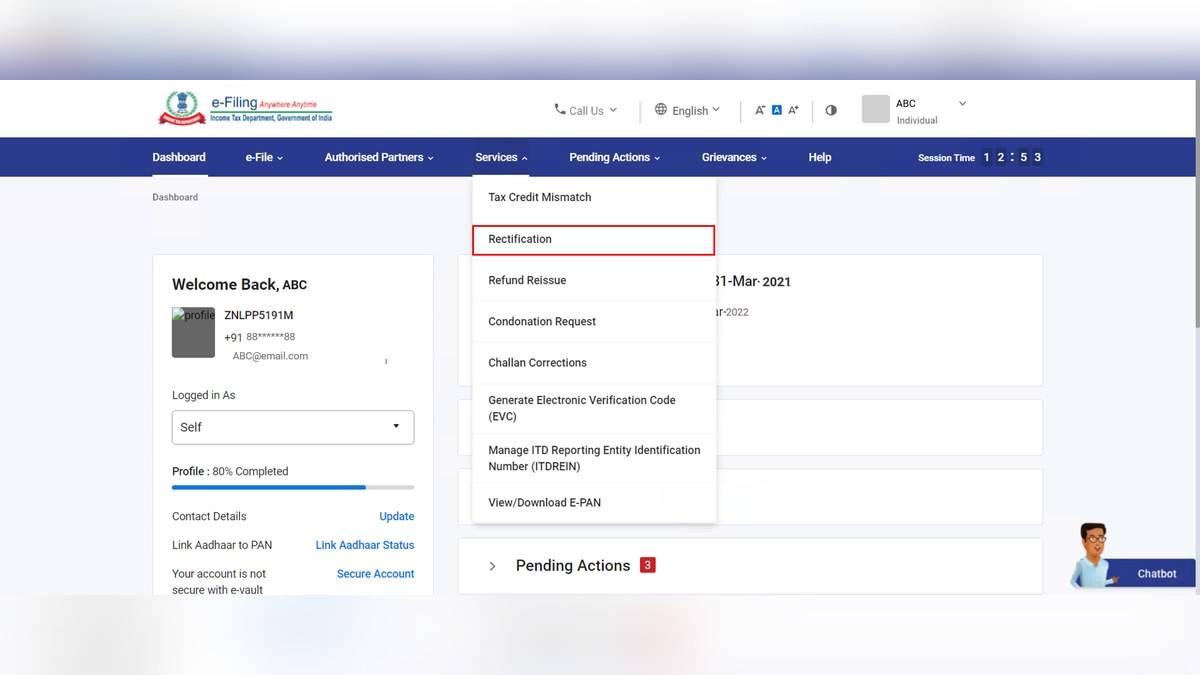
An ITR rectification request asks the Income Tax Department to correct a mistake apparent from the record in a processing intimation or order. It is different from filing a fresh return or adding an omitted deduction. For a return processed by the Centralised Processing Centre, the official portal provides a Rectification service under Services.
This guide covers the portal's assessment year based workflow for processed returns and intimations referring to sections 143(1) and 154 of the Income Tax Act, 1961. It does not treat those section numbers as instructions for every tax year or every notice. Start with the year, issuing authority and statutory reference printed on your own intimation.
| Problem | Route to examine |
|---|---|
| Correct return particulars were not considered | Reprocess the Return |
| Incorrect TDS, TCS or tax challan details | Tax Credit Mismatch Correction |
| Apparent error in return data already filed | Applicable Return Data Correction option |
| New income or a new deduction | Check the legally available return correction route |
When should you file an ITR rectification request?
The department's rectification FAQ uses the test of a mistake apparent from the record. A smaller refund than expected is a reason to investigate the computation, but it does not by itself establish such a mistake. Compare what you filed with what the department processed before selecting a request type.
Keep three records together: the filed return, the processing intimation and the evidence for the particular item in dispute. For a tax credit issue, that could include the relevant tax statement and payment challan. For a processing discrepancy, mark the schedule and line already present in the filed return. A general statement that the refund is wrong is less useful than an identifiable difference.
For example, suppose an invented case shows a taxpayer claimed Rs 12,000 of supported tax credit but the intimation considered Rs 8,000. The Rs 4,000 difference identifies what needs checking. It does not establish a Rs 4,000 refund entitlement: the rest of the tax computation still matters. The first task is to reconcile the credit and confirm the correct year and account references.
How to raise rectification on the income tax portal
The department's public user manual shows this sequence: sign in to the official e-Filing portal, open Services, choose Rectification and select New Request. Select Income Tax and the appropriate assessment year, then continue. These are instructions for readers; this report was researched entirely from public pages without accessing any taxpayer account.
Choose the category that matches the error. Reprocessing is relevant where the original particulars were correct but were not considered during processing. Tax credit mismatch correction deals with entries such as TDS, TCS, advance tax and self assessment tax. A return data correction is not permission to rebuild the return around a new claim.
The manual shows tax credit schedules populated from the processed return, with options to edit the relevant details. Review the whole affected schedule, including entries that were already correct. Altering one line while accidentally dropping another can create a new discrepancy. Save a draft where the workflow offers that facility and compare it with your evidence before submission.
For offline return data correction, the manual describes preparing the applicable return data file. Use the format and utility required for the selected year and request. A screenshot, a narrative letter and a return data file serve different purposes; uploading one in place of another does not make them interchangeable.
Can rectification add income or claim a new deduction?
The FAQ says not to introduce a new income source or an additional deduction through return data rectification. It also says tax credit correction should not claim credits absent from Form 26AS. If the underlying reporting is missing, identify that problem rather than assume changing the rectification entry alone will resolve it.
A revised return and a rectification request perform different jobs. Whether a revised or another return is legally available depends on the relevant year and circumstances. This guide does not state a universal filing deadline for those other routes. In particular, the existence of a Rectification button should not be read as extending a return revision deadline.
There is a public guidance inconsistency about verification: the FAQ says rectification does not need e-verification, while parts of the manual show a verification screen. Follow the requirements actually displayed for the selected request and keep the final acknowledgement. Do not infer successful submission merely because a help page says a particular step is unnecessary.
How to check rectification status
Preserve the reference number and check the request in the portal's Rectification Status service. Compare the eventual response with the exact issue raised. If the request belongs with the Assessing Officer, use the applicable officer route shown by the portal rather than repeatedly selecting an unavailable CPC option.
For related checks, read our guides to AIS and TIS, refund status and filing and verifying an ITR. Filing, processing correction and refund payment are separate stages, so identify which stage contains the problem before acting.