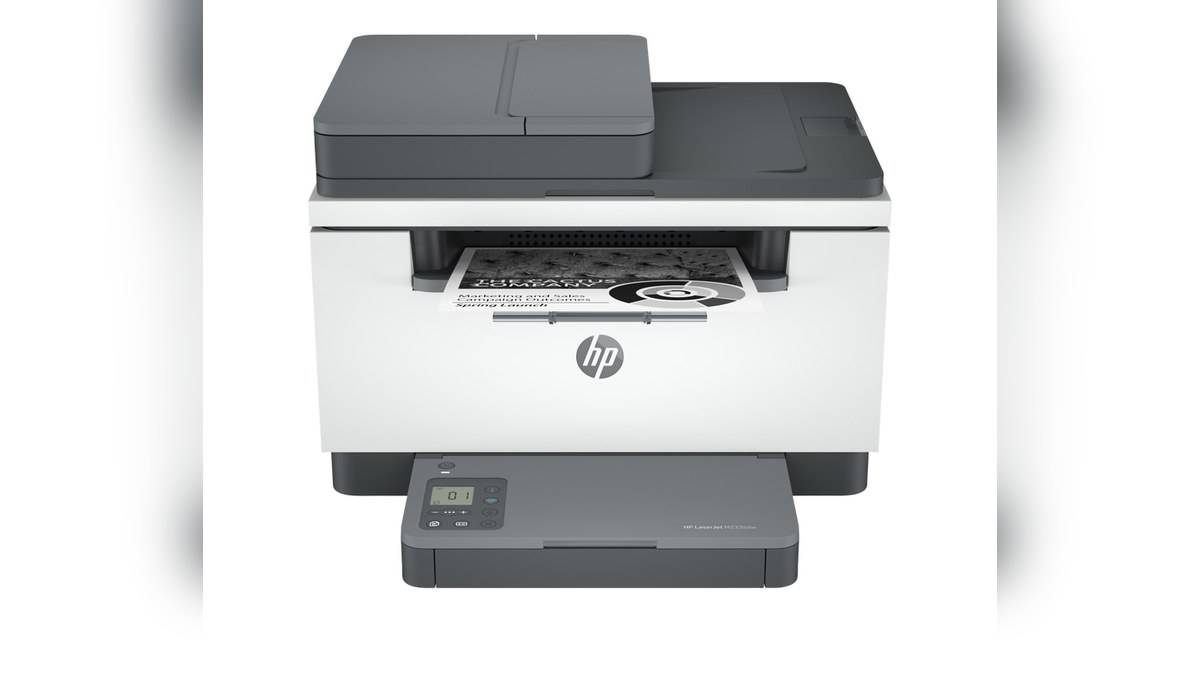
NEW DELHI: HP rates the LaserJet MFP M233sdw at up to 29 ppm for single-sided A4 printing and up to 18 ipm for automatic A4 duplex printing. These are different operating modes. The duplex figure counts printed images, so it should not be read as 18 fully printed two-sided sheets every minute.
| Specification | HP M233sdw, 6GX06A#ACJ |
|---|---|
| A4 single-sided print | Up to 29 ppm |
| A4 automatic duplex print | Up to 18 ipm |
| Letter single-sided / duplex | Up to 30 ppm / 19 ipm |
| ADF capacity | 40 sheets |
| Duplex ADF scanning | No |
| Recommended monthly print volume | 200 to 2,000 pages |
Count printed faces before comparing the rates
A two-sided sheet contains a printed image on each face. In duplex mode, the machine must complete the work on both faces before delivering that sheet as finished output. Images per minute and sheets per minute therefore cannot be substituted for each other when estimating how a report moves through the printer.
For an office administrator, the distinction affects scheduling more than the wording on a brochure. A report prepared for two-sided circulation is a different job from loose single-sided notices. Decide the required output format first, then use the corresponding speed specification. Otherwise, a delivery estimate can be wrong before the file even enters the queue.
HP's A4 and Letter figures must also stay separate. A headline using the highest rate may refer to Letter, while the paper routinely loaded in an Indian office is A4. The relevant comparison is the same paper size, operating mode and measurement unit, rather than the largest number printed on either machine's product card.
Treat duplex as a job setting, not a promise for every file
HP confirms automatic duplex hardware on the M233sdw. Before a run, inspect the print dialog for the selected printer, paper size and two-sided setting. The physical capability and the document's chosen output settings are separate checks: the presence of a duplexer does not tell an operator how the current job has been configured.
For a working proof, print enough of the document to check front-to-back orientation and page order. A report intended to turn like a book needs to remain readable when the sheet is turned in that way. Confirm the result before distributing copies, particularly where an application has remembered settings from an earlier job.
Do the acceptance check on the computer and application that will actually submit the work. A saved PDF, a browser document and a spreadsheet need not expose their print options in the same place. Record an approved routine for the office rather than expecting every user to infer it from the printer's model suffix.
The document feeder belongs to the input side
The M233sdw has a 40-sheet automatic document feeder, but the specification explicitly says duplex ADF scanning is unavailable. That prevents another common misunderstanding: automatic two-sided print output does not establish automatic capture of both sides of an original. The ADF and duplex print engine perform different parts of the job.
A scanned original and a digital document sent directly to print also have different starting points. For a scan-and-copy task, the operator must first make sure all intended content has been captured. For a file that is already complete, the remaining checks concern output. Keeping those stages separate makes it easier to find an omitted reverse page.
Test the finished workflow, not just the running engine
HP's speed notes say results vary with factors including system configuration, software, the driver and document complexity. The rated print speed also excludes the first set of test documents. It is therefore a benchmark for comparing stated capabilities, not a guaranteed stopwatch result for a real office packet.
The linked M233sdw technical sheet lists a 150-sheet input tray and a 100-sheet output tray. For shared work, consider where completed packets will be collected and how jobs will remain separated. Paper-handling interruptions are part of the operator's experience even when the print engine is capable of a faster continuous rate.
Use the recommended monthly range in the table for ongoing print planning. The larger duty-cycle number on the page has another purpose in describing capability. An office with steady production needs should not turn that headline maximum into a routine target simply because the machine includes an automatic feeder and duplex hardware.
This model combines monochrome output with scanning and copying, so judge those jobs separately. Ask whether the normal document begins on paper, whether both faces carry content, whether colour capture matters and what the finished packet should look like. Those questions provide a more useful specification checklist than ranking every function by a single speed number.
Our HP Smart Tank 580 vs 585 price: 585 starts lower at Rs 14,999, Canon MAXIFY GX1070 and GX2070 price list: Rs 29,340 to Rs 33,275 and HP 430 Multi-Device Wireless Mouse price: Rs 2,229 cover other printing configurations. Check their input and output functions independently rather than carrying the M233sdw's workflow assumptions across.
Official sources: HP LaserJet MFP M233sdw India and HP M233sdw technical sheet.