
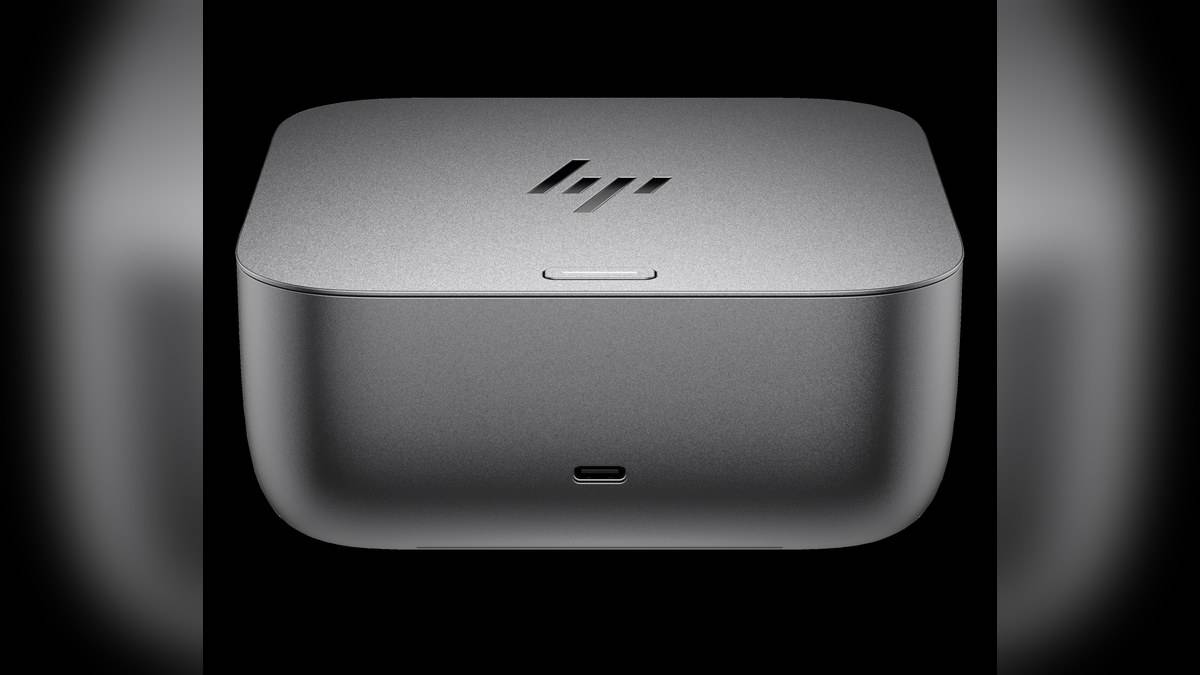
NEW DELHI: HP's USB-C 100W G6 Dock is listed at Rs 16,999 in India, while the Thunderbolt 4 100W G6 Dock is Rs 24,999. Both can supply up to 100W to a compatible host, but their display capabilities and connections differ. Paying for the Thunderbolt version does not buy a higher quoted host-charging ceiling in this particular pair.
| Official India listing | USB-C 100W G6 | Thunderbolt 4 100W G6 |
|---|---|---|
| Price including taxes | Rs 16,999 | Rs 24,999 |
| Product code | 9X3V1UT#ACJ | 9X472UT#ACJ |
| Host power | Up to 100W | Up to 100W |
| External-display ceiling | Up to 3 | Up to 4 |
| Weight | 680 g | 740 g |
| Limited warranty | 3 years | 3 years |
Price as of 23 November 2026, 00:21 IST. The figures are HP India's visible selling prices before a promotional code. The store also shows separate MRPs and code-dependent amounts, which are not used for this comparison. These are current listing observations, not an announcement of a new India launch or a promise about future pricing.
The same wattage serves different connections
According to HP India's technical tables, the USB-C model delivers host power through USB Type-C, while the other uses Thunderbolt 4. Both listings include a 120W external power adapter in the box. The adapter's rating is not the same specification as power available to the laptop, which HP separately caps at up to 100W.
This distinction is relevant to a gaming-laptop desk. A charging connection may simplify light office work, but the dock's stated output must be compared with the computer's own charging requirements. The shared 100W label does not establish that either dock replaces every laptop's supplied adapter during a demanding workload. Neither listing makes that universal claim.
Display support depends on the host
The USB-C dock's table describes up to three external displays. Its supported combinations vary between multifunction PCs and high-resolution PCs using DisplayPort Alt Mode. HP lists a single 4K display at 120Hz, with other combinations subject to the appropriate host configuration. The headline display count should therefore be read together with the compatibility matrix.
The Thunderbolt dock lists up to four external displays and includes separate configurations for Thunderbolt and non-Thunderbolt computers. Its table also names a maximum refresh rate of 360Hz and a maximum resolution of up to 8K. Those are separate ceilings, not a statement that every connected display runs at the maximum resolution and refresh rate simultaneously.
For someone connecting a fast monitor, this makes the computer's output capabilities central to the comparison. A socket that physically accepts the cable is only the beginning. The intended number of screens, each screen's resolution and refresh rate, the notebook's supported display streams and the operating system must fit the configuration HP actually documents.
Ports and the physical desk
Both products list HDMI 2.1, two DisplayPort 1.4 outputs and an RJ-45 port rated for 2.5 GbE. Both also provide USB Type-A and USB Type-C connections. The Thunderbolt version adds a Thunderbolt 4 connection rated for 40Gbps. This is a more useful distinction than simply counting the sockets visible in a product photograph.
HP gives dimensions of 12.1 x 12.1 x 5.1 cm for the USB-C dock and 12.1 x 12.1 x 4.95 cm for the Thunderbolt dock. Their footprints are therefore similar, with different listed heights and weights. A shared workspace still needs room for plugs, cable bends and access to peripherals around the dock, beyond the dimensions of the enclosure itself.
Management features have conditions
HP lists Poly Lens, electronic tagging and HP CMSL management tools for these docks, alongside HP Sure Start and a three-year limited warranty. These features give the comparison an office-deployment dimension beyond video outputs. A team managing desks needs to identify devices and maintain firmware as well as connect keyboards, displays and a network cable.
However, HP's footnotes make clear that some wake, power-button and MAC-address functions depend on an HP or supported notebook. HP also says it does not provide Ethernet and audio drivers on Mac PCs. The supported operating-system list should not be read as an assurance that every advertised function behaves identically on every machine.
The Thunderbolt package explicitly lists a 1 m Thunderbolt cable with the dock and power adapter. Cable specification therefore belongs on the deployment checklist too: a spare charging lead should not be assumed to reproduce all the documented video and data functions.
For related desk equipment, see our OMEN 27q G2 and 27 G2 comparison, HP 430 mouse guide and HP 350 keyboard guide. Official sources: HP USB-C G6 India page and HP Thunderbolt G6 India page.