

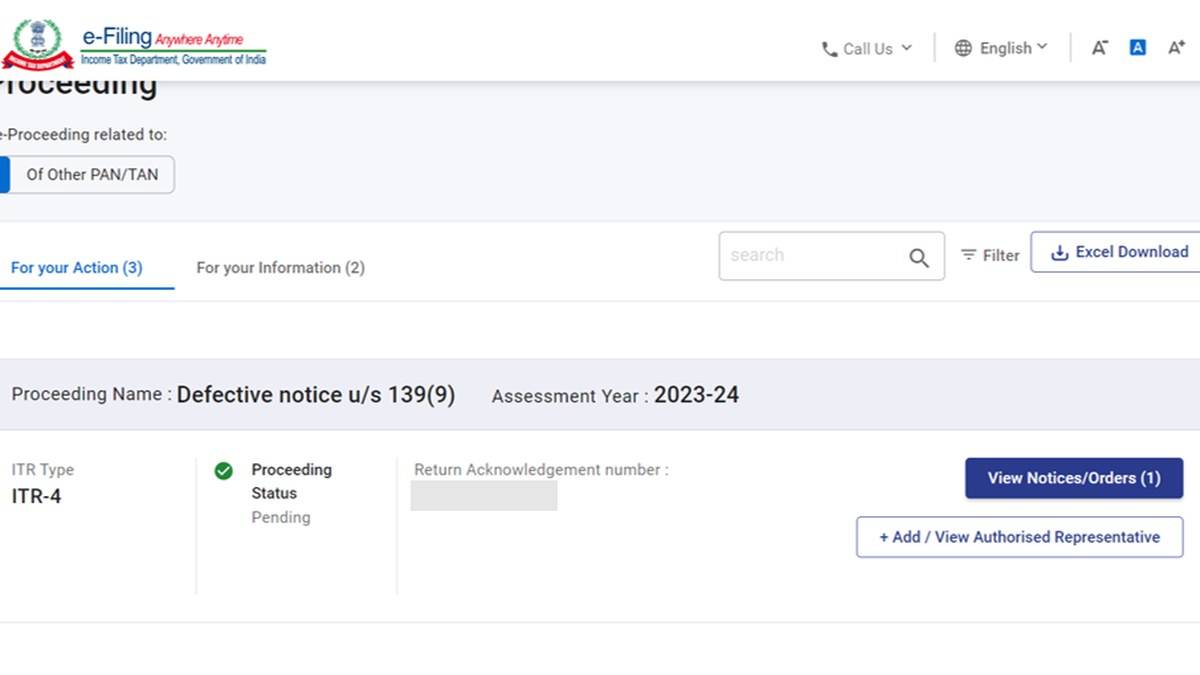
To respond to a defective return notice under section 139(9), open Pending Actions, then e-Proceedings on the income tax e-filing portal, read the notice and submit your response against that notice. The Income Tax Department says the usual response period is 15 days from receipt, or the period specified in the notice. You can request an extension, but should check the response deadline before preparing a correction.
| Question | Official position |
|---|---|
| Where is the notice? | Pending Actions, e-Proceedings |
| How long do you get? | 15 days from receipt, or the period in the notice |
| Can you disagree? | Yes, with reasons |
| Can a submitted response be withdrawn? | No |
What does a defective return notice mean?
A defective return has incomplete or inconsistent information in the return or its schedules. The department's e-Proceeding FAQs explain both the reasons a return can be defective and the response process. Start with the particular defect identified in your notice, rather than assuming that every notice concerns unpaid tax.
The FAQs list several common problems: claiming TDS credit without offering the corresponding income, reporting receipts below the receipts on which TDS credit is claimed, and entering zero income while computing and paying tax. A name mismatch with the PAN database can also cause a defect. For business or professional income, missing required balance sheet and profit and loss information is another example.
The section number matters. The current FAQs refer to section 139(9) of the Income-tax Act, 1961 and section 263(7) of the Income-tax Act, 2025. This guide describes the department's published section 139(9) response workflow. Read the Act, section and year shown on your own notice before selecting a response.
How to respond to a defective return notice online
The department's e-Proceedings user manual requires a registered portal account, an active PAN and a notice issued by the department. A representative responding for someone else needs the relevant authorisation. These are prerequisites for the service, rather than documents that prove the defect has been corrected.
- Enter the official e-filing portal yourself and sign in. From the dashboard, select Pending Actions and e-Proceedings.
- Select Self and locate the defective notice. The updated FAQs also identify the For your Action area for notices requiring a reply.
- Choose View Notice. Open the Notice/Letter PDF and download it so you can check the defect, relevant year and response deadline.
- Select Submit Response against the notice and decide whether you agree with the stated defect.
- Review the response and declaration before completing submission. Save the Transaction ID and confirmation email.
If you agree, the manual's offline response route asks you to select the response mode and ITR type, then upload the correct JSON file. That is the corrected return data file required by this workflow. A PDF copy of an old return is a different document. Follow the instructions presented for the particular notice and return form.
If you disagree, the manual provides a route to enter your reasons and submit them. Explain why the information already filed addresses the stated defect, referring to the relevant schedule or entry. Disagreement needs a reason tied to the notice; merely saying that a return was previously uploaded does not explain an income or schedule mismatch.
What is the time limit, and can you ask for more time?
The department says 15 days from receiving the notice, or the duration specified in it. Its FAQs allow taxpayers to seek adjournment and request an extension. Read the actual notice rather than using the original annual ITR filing deadline as the deadline for this response. Keep a record of any extension request and check whether additional time has been allowed.
Missing the stipulated response period can lead to the return being treated as invalid. The department lists possible consequences including interest, penalties, loss of carry forward of losses and loss of specific exemptions, depending on the applicable provisions. These are possible consequences, not a fixed charge automatically payable by every person receiving a defective notice.
Can you file a fresh or revised return instead? The FAQs say that route may be available while the relevant filing window remains open. Once that window has expired, the taxpayer must respond to the defective notice. Check the applicable year and filing window before treating a revised return as an available alternative.
What should you check after submitting?
A successful submission produces a Transaction ID and a confirmation on the registered email address. The manual also provides View Response so you can inspect the remarks and response details. Retain these alongside the downloaded notice and the corrected file used for submission.
The department says a submitted defective notice response cannot be updated or withdrawn. Its current FAQs also say a response made through e-Proceedings does not require separate e-verification. This concerns the notice response; it should not be confused with the verification requirements for filing an income tax return.
For the supporting records, see our guides to downloading a filed ITR and receipt and checking AIS information. If the issue instead concerns correcting a processed return, our ITR rectification guide explains that separate service. Identify the notice and service first so your response reaches the relevant proceeding.