
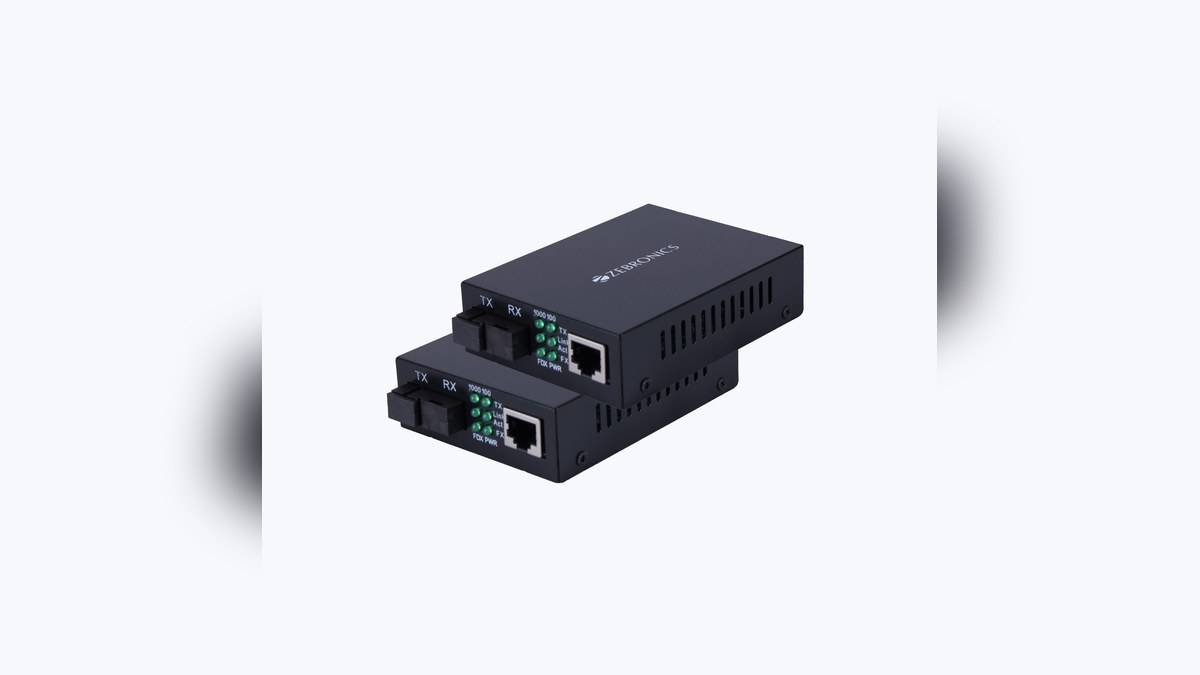
NEW DELHI: The Zeb FMC1000 is listed at Rs 2,899, including tax, for a package containing a pair of media converters and their power adaptors. It is a wired networking product for linking Ethernet and fibre, with an advertised optical reach of up to 10km. It needs an installation plan rather than a Wi-Fi pairing routine.
| Item | Official listing |
|---|---|
| Listed package | Rs 2,899, tax included |
| Contents | Two media converters, two power adaptors, QR code guide |
| Copper connection | RJ45, 10/100/1000Mbps |
| Optical connection | SC; advertised fibre distance up to 10km |
| Copper cable limit | CAT6, 23AWG: 100m |
| Power | 5V DC barrel input |
Price as of 20 November 2026, 00:02 IST.
Read the package price correctly
Zebronics' official FMC1000 product page lists two converter units and two power adaptors in the package. That matters when comparing quotations: a price for a pair should not be compared directly with a price for an individual unit. The page presents one priced FMC1000 package, without a separate menu of speed or distance variants.
The first question for a home compound, detached workroom or CCTV installation is whether there is a suitable fibre route between the places being connected. The converter package is only part of that route. Before treating its catalogue price as the project cost, establish what cable, termination, protection and installation work the site actually requires.
Two different cable limits
The official specification separates the copper and optical connections. Its long-distance claim applies to fibre, while the stated CAT6 limit belongs to the Ethernet cable side. Keeping those entries separate prevents a misleading assumption that the same long run can be made with an ordinary network patch cable.
The 10km figure is an advertised upper limit, not a measured result for the reader's premises. A buyer should have the installer specify the fibre and connection arrangement that will be used. The published distance does not settle practical questions about the route, connector condition, joints or equipment already installed at either end.
Where the FMC1000 fits in a home network
Think of this product as a transport link between network locations. The equipment at each location still has its own job. A router manages the broader home connection, a switch distributes wired connections, and a wireless access point serves nearby wireless devices. The converter should be placed in that drawing before equipment is ordered.
The useful domestic example is a recorder or access point in a separate building where a wired connection is preferred. Mark the copper equipment connections at the ends and the optical section between them. That simple diagram helps expose missing items, including suitable power points and any additional network sockets needed at the remote location.
Speed, power and physical placement
Zebronics lists automatic negotiation on the Ethernet side. Link compatibility still needs to be considered across the whole path: a faster converter cannot turn a slower router port, attached device or internet service into a faster one. Evaluate the capacity required by the actual workload, especially where camera traffic shares the link with normal household use.
Each end needs power. An installation that places a converter in a remote enclosure should account for access to its supply and for how the equipment will be restarted if a fault occurs. Avoid putting power components somewhere that can only be reached by dismantling a camera bracket or opening an inaccessible ceiling void.
The compact format can be useful, but cable routing deserves attention. Allow space to handle connectors without pulling on the leads, and keep equipment identifiable at both ends. A label that names the destination can save considerable confusion when a future service visit involves several otherwise similar network connections.
Alternatives and purchasing checks
For a short route within the suitable copper distance, a normal Ethernet installation may be the simpler design to assess. Where a remote area needs wireless coverage, a mesh or access-point arrangement is another category to evaluate. These are planning alternatives, not claims that they offer the same performance or installation conditions as this converter pair.
Ask for a written equipment list that distinguishes the converter pair from fibre, labour and any switches or access points. This makes it possible to compare installation proposals on the same basis. A cheaper hardware line is not necessarily a cheaper working connection if important parts have been left out of the quotation.
Before accepting the installation, check communication in both directions using the equipment that will normally use the link. For CCTV, that means checking the intended recorder view and playback workflow rather than merely observing a lit connector. Keep the invoice and the exact FMC1000 model reference with the site diagram so that later maintenance starts from a reliable record.
Related reading: NETWIZ300A router guide, 8PPG2UGS PoE network guide, 10-channel NVR guide.
Official sources: Zebronics product page.