
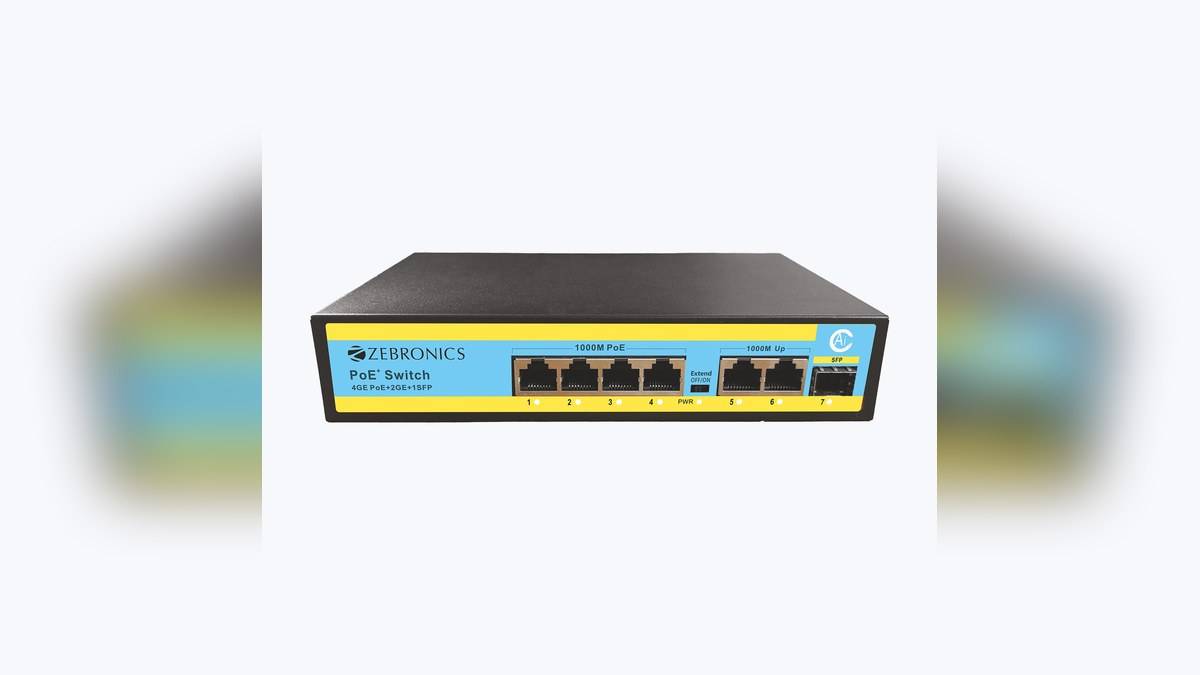
NEW DELHI: Zebronics lists the Zeb 4PG2UG1UF 65 PoE switch at Rs 4,799, including tax. It provides four powered network connections with a shared maximum power budget of 65W and an advertised ceiling of 30W per port. Those limits need to be read together when planning compatible home security cameras.
| Item | Official listing |
|---|---|
| Listed model | Zeb 4PG2UG1UF 65: Rs 4,799, tax included |
| Powered connections | Four self-adaptive PoE ports |
| Shared power budget | 65W maximum |
| Per-port ceiling | Up to 30W |
| PoE compatibility | IEEE 802.3af/at |
| Other listed features | AI Watchdog; dynamic power control; SFP port |
| Included items | Switch, power cord, QR code guide |
Price as of 20 November 2026, 00:02 IST.
The listed model and its power limits
According to Zebronics' official product page, this is an unmanaged PoE switch with IEEE 802.3af/at compatibility. The page shows one priced configuration for this model. The number in its model name should not be used as a substitute for reading the specification or identifying the exact unit on the seller's invoice.
The important domestic context is an entrance and perimeter camera installation where network cables also carry power to compatible equipment. Draw the camera locations before deciding on the switch. That plan should identify each device, its power requirement, its cable route and the connection back to the recorder or main home network.
A per-port maximum is not the total budget
The individual port ceiling and the shared power budget describe different constraints. A camera must fit the supported electrical arrangement, and the complete set of attached powered devices must fit the switch's overall budget. The presence of an available socket does not establish that enough power remains for another device.
Ask the installer to prepare a device-by-device power schedule using the proposed cameras' official requirements. Include the relevant operating conditions rather than assuming that a daytime idle reading represents every situation. The purpose is to establish a workable system before installation, with enough margin for the equipment actually being supplied.
Resolve the uplink description before ordering
The official page contains inconsistent wording: the short highlights say Megabit uplinks, while the later features and connector table describe Gigabit uplinks. This guide does not treat uplink speed as independently settled. If that connection is central to the project, have the supplied unit and its documentation checked before accepting the order.
This is a useful reason to put the full model code in the quotation. A generic description such as a four-port camera switch is insufficient when similar-looking units have different network capabilities. Ask the seller to confirm that the physical product and invoice match the configuration being proposed, rather than relying on a family photograph.
Cabling and distance need a proper design
The same specification distinguishes its extended-distance claim from normal higher-speed cable operation. It associates the extended PoE distance with a reduced-speed mode over Cat6. A long-distance label should therefore never be read as a promise that every connection runs at its fastest rate over the longest advertised cable route.
Have the installer document the intended mode and cable arrangement for each difficult run. A route that reaches the far gate may be more demanding than the shorter path to an entrance camera. Commission the link using the actual camera stream and the settings planned for recording, rather than judging it by a power indicator alone.
What the convenience features mean for handover
Zebronics lists AI Watchdog and dynamic power control, but its product text does not establish detailed recovery behaviour for every connected camera. Treat those names as listed functions, not as a guarantee that the installation can never need attention. Ask the installer to demonstrate the controls that are relevant to the agreed setup.
Keep a simple diagram with port labels and camera locations beside the recorder records. If a view later disappears, that information can help identify the relevant cable and device without disconnecting unrelated equipment. It also makes a future expansion easier to assess because the occupied ports and assigned power loads are visible.
Alternatives, installation costs and the final check
An ordinary Ethernet switch is an alternative only where camera power is supplied through a separate suitable arrangement. A larger PoE switch is another category to examine if the camera plan exceeds this unit's connection or power provision. Compare those options through the complete installation design rather than treating port count as the only difference.
The official package contains the switch, power cord and guide. Cameras, recorder, storage and site cabling are not named in that package list. Request separate quotation lines for the equipment and installation work that turn the switch into a functioning security network, especially where existing cables are to be reused.
Before sign-off, check all intended camera views together, then review saved footage through the recorder. Keep the confirmed model information and installation settings with the invoice. The listed price is a useful starting point, while a documented power plan and resolved uplink specification determine whether this particular switch fits the property.
Related reading: NETWIZ300A router guide, 8PPG2UGS PoE network guide, 10-channel NVR guide.
Official sources: Zebronics product page.