
NEW DELHI: Zebronics lists the 10CHVS6TA8M NVR at Rs 5,999, including tax. This network video recorder supports IP-camera recording, local display connections and smartphone access. Its headline camera support is only part of the specification: storage, aggregate bandwidth and playback capacity also need checking before it becomes the centre of a home CCTV system.
| Model and price | Zeb 10CHVS6TA8M NVR: Rs 5,999 |
|---|---|
| Video input | 10 IP channels |
| Supported camera ceiling | Up to 8MP |
| Total bandwidth | 80Mbps |
| Storage interface | 1 SATA, compatible with up to 6TB |
| Display connections | 1 HDMI and 1 VGA; output up to 4K |
| Simultaneous playback claim | Up to 4 channels |
| Network and USB | Gigabit RJ45; 2 USB 2.0 ports |
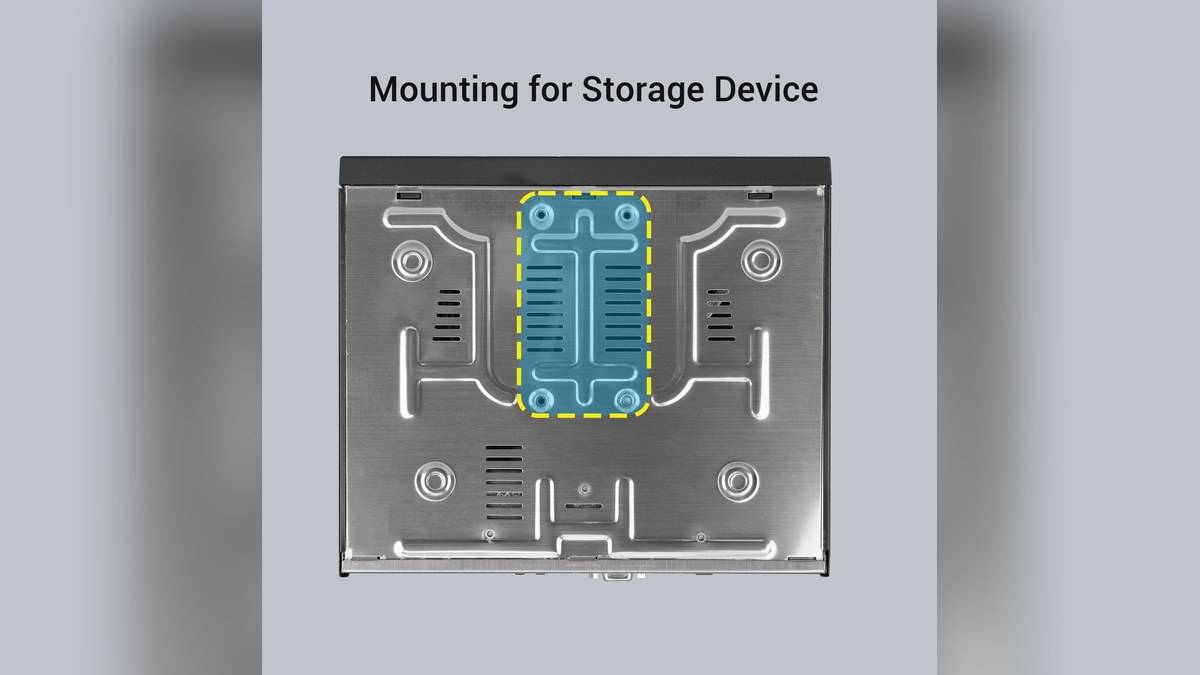
Price as of 19 November 2026, 02:36 IST. The product page shows a single model price, without a separately priced storage bundle. Its package list includes a recorder, power adapter, mouse, hard-disk mounting kit and QR code user guide. A hard disk is not named in that list, so obtain an itemised quotation before assuming the listed amount buys a complete recording installation.
Check that the cameras belong on an NVR
Start by identifying the exact camera models already installed or proposed. The input specification here is for network cameras. Ask for the camera connection method and supported stream to be demonstrated with this recorder. A broad compatibility label should be the beginning of that discussion, particularly when a household is mixing equipment bought at different times or from different suppliers.
ONVIF is listed, along with other network protocols, but this guide has not tested a particular mixed-brand installation. Put the camera model and required functions in the work order. Ask to see picture, audio where required, recording and playback together. A live picture appearing on the monitor does not by itself prove that the household's intended recording arrangement has been configured successfully.
Keep the different capacity figures separate
The channel count describes how many IP inputs the product supports. The megapixel ceiling describes supported camera resolution. The total bandwidth is a different limit again. These figures cannot be substituted for one another. Have the installer list the streams and settings planned for the recorder and explain how their combined demand fits within the documented bandwidth.
Likewise, the page's multi-screen preview options are not a promise that every recording can be played back simultaneously. The separate playback claim is narrower. If reviewing several viewpoints at once is important, ask for that exact task to be demonstrated before the installation is accepted. For a household investigating an incident, a usable review workflow matters as much as a wall of live thumbnails.
The display-output figure also deserves its own check. Connecting a high-resolution monitor does not turn an unsuitable camera stream into more detailed evidence. Frame the entrance and parking positions around what needs to be recognised, then inspect a saved clip from each. This is a more useful acceptance exercise than judging the system entirely from the recorder's menu resolution.
Set a retention goal before choosing storage
The storage specification gives a compatible drive ceiling, not a guaranteed number of days of footage. Recording settings, camera activity and the selected recording mode all belong in the retention discussion. The official page lists scheduled and alarm-related recording options, plus H.265/H.264 decoding. It does not provide a universal retention period that can be quoted for every installation.
Ask the installer to state the intended retention goal and explain how it will be checked after the system has operated normally. Keep a note of the chosen settings so that a later change is visible. If the oldest footage disappears sooner than expected, that record gives the household a clear starting point for reviewing the configuration rather than assuming that the drive has failed.
Make remote access part of the handover
Zebronics lists P2P smartphone access, motion notifications and CMS compatibility. Treat those as functions to verify during setup. Ask for a demonstration from the phone that will actually be used, with the owner retaining control of the credentials. Check that the correct camera names appear and that a notification can lead to the relevant recorded event rather than only opening a live view.
A household should also practise finding and exporting a saved event before it needs one urgently. The supplied mouse and local display outputs make local operation part of this product's design. Agree who can review recordings and where an exported copy will be kept. These are practical operating decisions for the owner, rather than capabilities to assume from the presence of smartphone support.
The official recorder collection lists the 16CHVS6TA8M NVR at Rs 10,999 as a larger-channel alternative. Compare its complete specification if the camera plan will grow. For related context, see our Zeb IPPBSL5 vs IPPDSL5 price: IPPDSL5 starts lower at Rs 5,199, Zeb AHDPDSL24 price: Rs 2,999 for the home CCTV dome camera and Zeb EnergiUPS price list: Rs 1,299 to Rs 1,699.
Official sources: 10CHVS6TA8M NVR and Zebronics recorder collection.