
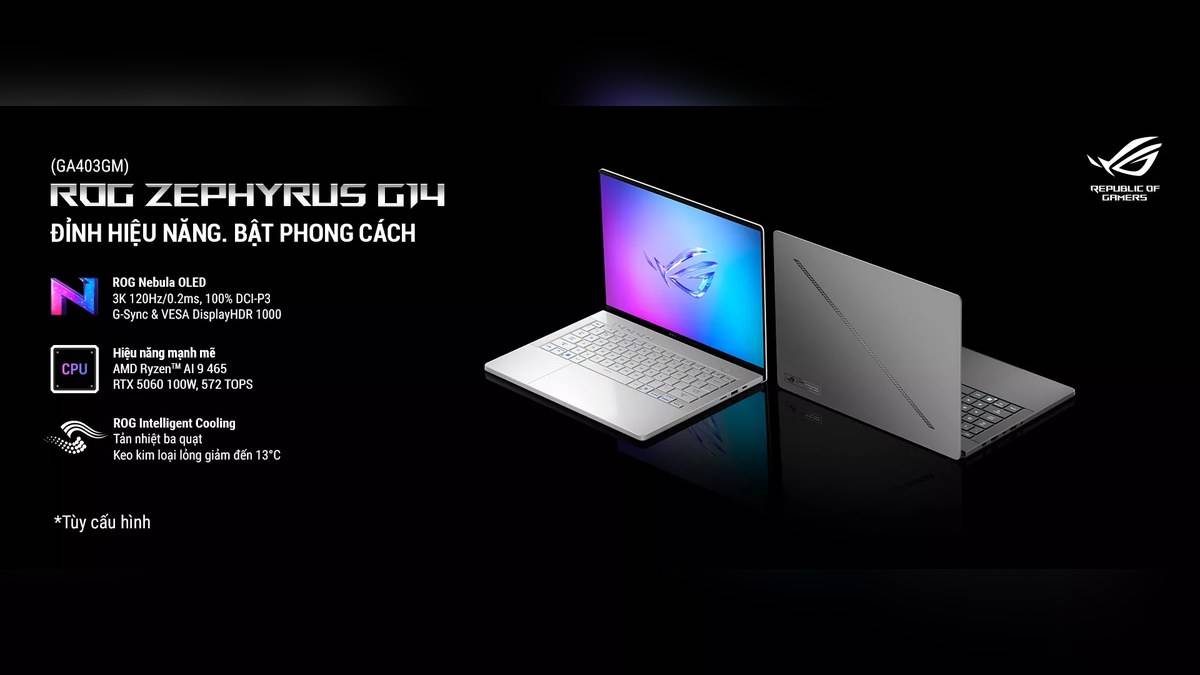
NEW DELHI: The ASUS ROG Zephyrus G14 GA403GM is listed at Rs 2,59,990 for the 16GB RAM and 1TB SSD version, and Rs 2,89,990 for the 32GB and 2TB version on ASUS's India store. Both use AMD's Ryzen AI 9 465 processor and NVIDIA's GeForce RTX 5060 Laptop GPU. The choice is principally about memory and storage, rather than moving to a different graphics tier.
| Listed configuration | India price, including taxes | Memory and storage |
|---|---|---|
| GA403GM-SY163WS | Rs 2,59,990 | 16GB LPDDR5X, 1TB SSD |
| GA403GM-SY132WS | Rs 2,89,990 | 32GB LPDDR5X, 2TB SSD |
| Shared display | 14-inch OLED, 2880 x 1800, 120Hz, G-SYNC | |
| Shared graphics | GeForce RTX 5060 Laptop GPU, 8GB GDDR7 | |
Price as of 27 November 2026, 23:38 IST. These are the displayed laptop prices before conditional bank, exchange or finance benefits. ASUS lists other G14 platforms separately; this guide covers the two verified GA403GM configurations above and does not present them as the complete G14 catalogue.
The memory decision comes before the SSD decision
According to the ASUS India product pages, both configurations have onboard memory with no expansion possible. That makes the larger version relevant to people whose workload will grow. Someone juggling a development environment, creative applications and browser-based work cannot treat a later RAM upgrade as a fallback. The extra capacity has to be selected when ordering.
Storage is a different question. The entry version's page specifies an SSD upgrade path and a single M.2 expansion slot. That is not a promise of an empty second drive bay. A buyer planning to replace the supplied drive should account for moving files and reinstalling or transferring the working environment. RAM and SSD capacity therefore deserve separate decisions, even though ASUS bundles both increases into the higher-priced configuration.
A small gaming laptop with a demanding display
The G14 puts a high-resolution OLED screen into a compact machine. ASUS's official GA403 overview lists a 1.5kg design and describes its cooling arrangement as a combination of heatpipes, three fans and liquid metal. Those details explain its positioning: it is intended to carry dedicated graphics between locations without the bulk normally associated with a larger gaming notebook.
The display's resolution and refresh rate describe different benefits. Resolution concerns the detail available for documents, photographs and interfaces. Refresh rate concerns how frequently the panel can redraw. Neither figure establishes the frame rate of a particular game. Buyers should resist reading the screen specification as a guarantee that every title will run smoothly at its native resolution with demanding settings.
ASUS quotes peak HDR brightness of 1,100 nits and explains on the official overview that peak figures describe panel measurements, with actual brightness affected by integration and calibration. It would be misleading to turn that into a claim about sustained brightness across a full white document. For creators, checking the intended working mode matters as much as the headline HDR specification.
Power, connections and everyday use
The store specification lists a 73Wh battery and a supplied 200W adapter. Battery capacity is not a runtime result. In particular, a gaming session, video meeting and document session place different demands on the machine. The adapter also belongs in any assessment of what will be carried each day; the laptop's stated weight describes the computer.
For desk use, the listed connections include HDMI, USB-A, USB-C and USB4, alongside a microSD reader. That combination matters to someone connecting a monitor and existing peripherals while travelling. The infrared webcam supports Windows Hello, while the backlit keyboard and included sleeve make the package more complete for users moving between home and a workplace.
Who the two versions are for
The lower configuration suits a person who specifically needs a compact Windows gaming system and understands the fixed-memory limit. The larger configuration is more relevant when substantial multitasking or creative projects are part of normal work. These are interpretations of the published configuration, not benchmark findings. We have not established a performance difference through testing.
Ordinary document work alone does not explain this laptop's price. Its distinctive combination is portability, OLED and dedicated graphics. A student considering it for coursework should identify the applications that actually need the GPU, then check course requirements and software support. Buying for a hypothetical future workload can obscure whether the screen, size and memory suit present needs.
Rivals and the final configuration check
Readers weighing a larger machine can use our ROG Strix G18 and G16 guide, Zephyrus Duo and G16 comparison and TUF A16 and F16 guide as starting points. Those articles concern separate configurations; their specifications should not be transferred to the G14.
Before ordering, match the complete suffix on the invoice to the RAM and SSD in the table. Both verified versions include Windows 11 Home and Office Home 2024, with a separately time-limited Microsoft 365 Basic benefit. Keep the distinction between a permanent Office licence and a subscription benefit clear when comparing packages.
Official sources: ASUS GA403GM-SY163WS listing, ASUS GA403GM-SY132WS listing and official GA403 overview.