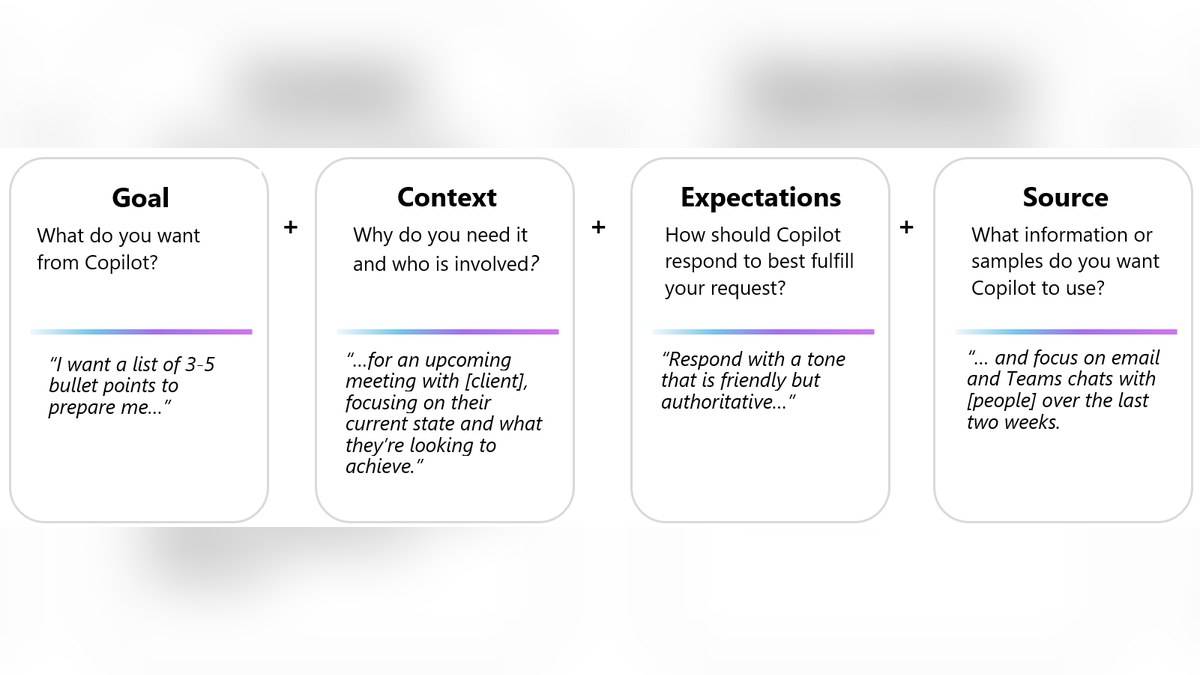
Useful Microsoft Copilot prompts tell the assistant what to do, why the task matters, which material to use and what the answer should look like. Microsoft calls these four ingredients goal, context, source and expectations. For everyday work, the biggest improvement is often naming the source and setting a clear boundary on what the assistant may infer.
A request such as “write a project update” leaves the audience, facts and format open. A more useful request supplies the notes, names the reader and asks Copilot to flag missing information. The examples below are original templates for common Indian workplace and study tasks. They are instructions to adapt, not demonstrations of tested output or a promise of factual accuracy.
| Ingredient | What to specify |
|---|---|
| Goal | The task, such as drafting or comparing |
| Context | The audience and purpose |
| Source | The supplied notes, document or accessible material |
| Expectations | Length, tone, structure and boundaries |
Microsoft Copilot prompts examples for work
Start with material you are allowed to use. Microsoft’s official prompt guide explains that available sources depend on the account. Mentioning an email, meeting or file in a prompt does not itself establish access. If the material is unavailable, supply an appropriate excerpt or choose a task that uses text already present in the conversation.
Example 1, a weekly update: “Using only the project notes pasted below, draft a weekly update for our department head. Use three sections: completed work, unresolved issues and next actions. Keep it under 180 words. Preserve names and dates exactly. If an owner or deadline is missing, write ‘not supplied’ instead of guessing.” This is useful when rough notes need a consistent structure without new commitments being invented.
The change from the vague version is practical. The goal is a draft update, the context is a department head, the source is the pasted notes and the expectations include a word limit and missing-data rule. Before using the draft, compare every completed item with the notes. A tidy heading does not establish that the work actually happened.
Example 2, a meeting agenda: “Turn the issues below into an agenda for a 30 minute internal planning meeting. Our purpose is to decide which tasks can begin this week. Group related issues, propose a discussion order and show suggested minutes for each item. Label the timings as proposals. Do not describe any proposal as an approved decision.” Use this when a list needs ordering rather than a factual research answer.
Example 3, a document comparison: “Compare the two versions pasted below. Make a table with the original wording, revised wording and a plain English explanation of the change. Focus on deadlines, responsibilities and exceptions. Quote the relevant phrases exactly. If a section appears in only one version, say so.” This gives a reviewer a starting point, but the original documents remain the reference.
Copilot prompts for revision and clear writing
Example 4, active revision: “Use only these class notes to ask me five short questions, one at a time. Wait for my answer before giving feedback. Explain which sentence in the notes supports your feedback. If the notes do not contain an answer, identify the gap instead of adding outside facts.” The purpose is to practise retrieval from a defined source, rather than receive an unsupported model answer.
Example 5, editing an announcement: “Rewrite this internal announcement for readers who have not attended the planning meeting. Keep the date, venue and contact details unchanged. Use short paragraphs and a calm, direct tone. List any ambiguous instructions separately. Do not invent registration requirements.” This separates clearer expression from factual changes, which still require the author’s judgement.
For all five examples, replace placeholders before sending the prompt. If the source contains names or sensitive details that the task does not require, consider using a suitable anonymised version. Do not assume that asking the assistant to ignore confidential information is equivalent to removing it from the input.
How to improve a Copilot response
Follow up with a specific correction. “Make it better” gives little direction. “Reduce the introduction to two sentences, retain every deadline and move unresolved questions to the end” tells Copilot what to change. Microsoft’s guidance expects a conversation with follow-up prompts, rather than treating the first answer as final.
Keep the verification task separate from the writing task. First check names, numbers, dates and source coverage. Then edit tone and length. Microsoft cautions that responses can contain errors and that repeating a prompt may produce different answers. Neither a confident tone nor a second attempt replaces checking the underlying material.
This guide follows the official documentation checked on 6 November 2026. It does not assume that a personal account includes organisational email search or that every Copilot feature appears in every app. Choose prompts that match the sources and controls available in your own account.
For related workflows, read our guides to Office 2021 support deadline: India prices and free alternatives, Surface Laptop Ultra price: $2,599.99 in US, £2,599 in UK, available from 16 October; no India listing yet and Microsoft Surface Laptop Ultra with NVIDIA RTX Spark opens for pre-order at USD 2,599, no India price yet.