
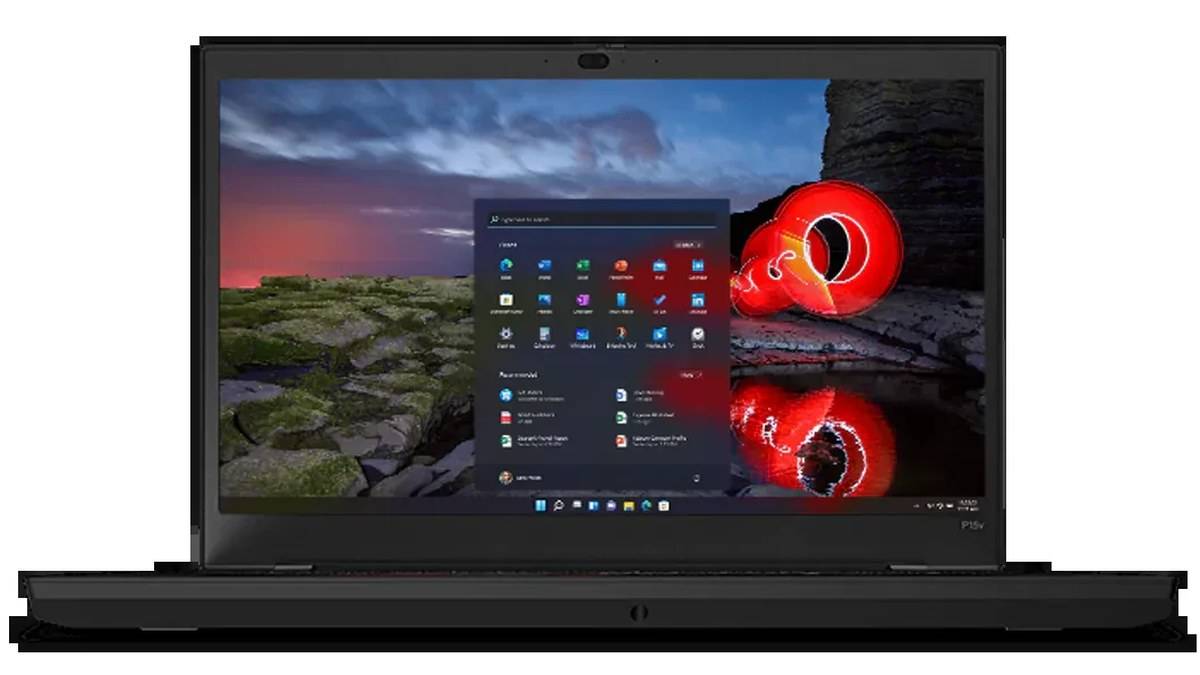
NEW DELHI: Lenovo's India store lists ThinkPad P15v model 21AAS28B00 at Rs 1,96,691, including shipping and taxes. The configuration has a Core i7-11850H, NVIDIA T600 graphics, 16GB RAM, a 1TB SSD and Windows 11 Pro. Its workstation identity needs to be read alongside the exact display, storage interface and service entitlement, rather than the family's highest advertised options.
| 21AAS28B00 | Listed configuration |
|---|---|
| Price | Rs 1,96,691 |
| Processor | Intel Core i7-11850H |
| Graphics | NVIDIA T600, 4GB GDDR6 |
| RAM and SSD | 16GB DDR4-3200 SO-DIMM, 1TB M.2 2280 |
| Panel | 15.6-inch FHD IPS, non-touch, 300 nits, 45% NTSC |
| Service | Three years Premier Support |
Price as of 26 November 2026, 23:09 IST. Source: Lenovo India's specific store listing, cross-checked against the ThinkPad P15v Gen 2 Product Specifications Reference, or PSREF. The store page requires location selection, so its numerical price does not establish stock or a delivery deadline for every Indian address.
Separate the workstation from its family options
The listing's processor belongs to the 11th-generation Intel platform. Lenovo's PSREF identifies this version as an eight-core, sixteen-thread processor. That is a concrete description of the platform, not a claim that it equals a current-generation processor carrying a similar Core i7 badge. Software requirements should name the hardware features that matter to the workload.
The T600 is likewise a specific graphics choice. The PSREF also lists other graphics options for the family, but those are not included merely because they appear on the same document. When comparing quotations for modelling or design work, insist on the graphics name in the order description and examine the software vendor's certification requirements separately.
Lenovo describes the P15v Gen 2 as offering ISV certifications. That is useful background for a professional purchasing process, but it does not establish that every edition of every application is certified on this exact configuration. Record the application version and proposed driver alongside the full machine code before an office standardises on it.
The screen is not the premium family panel
The India SKU has an anti-glare, non-touch Full HD display. Family marketing on the same store page discusses higher-resolution and wider-gamut alternatives. Those claims should stay with the relevant variants. A quotation for this suffix should not be described as including the family's highest-resolution screen or its most colour-capable option.
For a drawing-heavy desk, this makes the external-monitor plan part of the configuration assessment. Work out whether the laptop panel will carry palettes and documents while a separate display carries the main design. That arrangement is different from relying on the built-in screen for final visual approval, and it should be decided before selecting a dock.
Our Lenovo Idea Tab Plus vs Idea Tab price: Idea Tab starts lower at Rs 20,998 provides another professional-PC reference. For readers also considering a gaming machine, the Lenovo Legion Tab at Rs 36,000: identify Gen 2 before comparing gaming tablets shows a separate configuration to assess against the same application requirements, without assuming the two product categories are interchangeable.
Check expansion without promising faster storage
PSREF specifies two SO-DIMM slots and support for up to 64GB memory on the platform. The store's installed capacity is much lower than that maximum. Ask which slots are occupied before planning an upgrade, because a maximum capacity alone does not say whether an existing module can remain in place.
Storage deserves particular care. Lenovo's PSREF says the platform has two M.2 2280 PCIe 3.0 slots and explicitly notes that a PCIe Gen 4 SSD in such a slot operates at Gen 3 speed. The store's broader reference to Gen 4 storage should therefore not be treated as proof of Gen 4 transfer performance from this laptop.
This distinction is useful when an office already owns spare SSDs. Physical fit, interface support, drive capacity and the intended data-protection arrangement are separate checks. Establish them before buying parts. Do not turn a compatible drive's advertised maximum speed into a measured result for the P15v.
The platform reference identifies the T600 as a 25W graphics option and also lists higher-power alternatives. That helps explain why another P15v quotation needs more than a matching processor. A different graphics configuration is a different hardware package, even when the chassis photograph and most of the product name look identical.
Budget for the whole working setup
The SKU lists Thunderbolt 4, HDMI, USB-A and Ethernet, with a 135W adapter. Put the actual monitor, network cable and peripherals into a desk plan rather than counting connector shapes. Keep the supplied adapter available for the baseline setup; a dock's charging specification needs its own compatibility check.
The listed 68Wh battery and up-to-seven-hour claim are not a guaranteed shift length for professional workloads. The How to read Lenovo Tab M9 listings at Rs 9,499 and Rs 11,999 offers a general office-laptop comparison. For this P15v, preserve the invoice, exact suffix and Premier Support description together, then verify the device's entitlement when it arrives. None of those service words establishes accidental-damage cover by itself.
Official sources: Lenovo India P15v SKU listing and Lenovo P15v Gen 2 PSREF.