
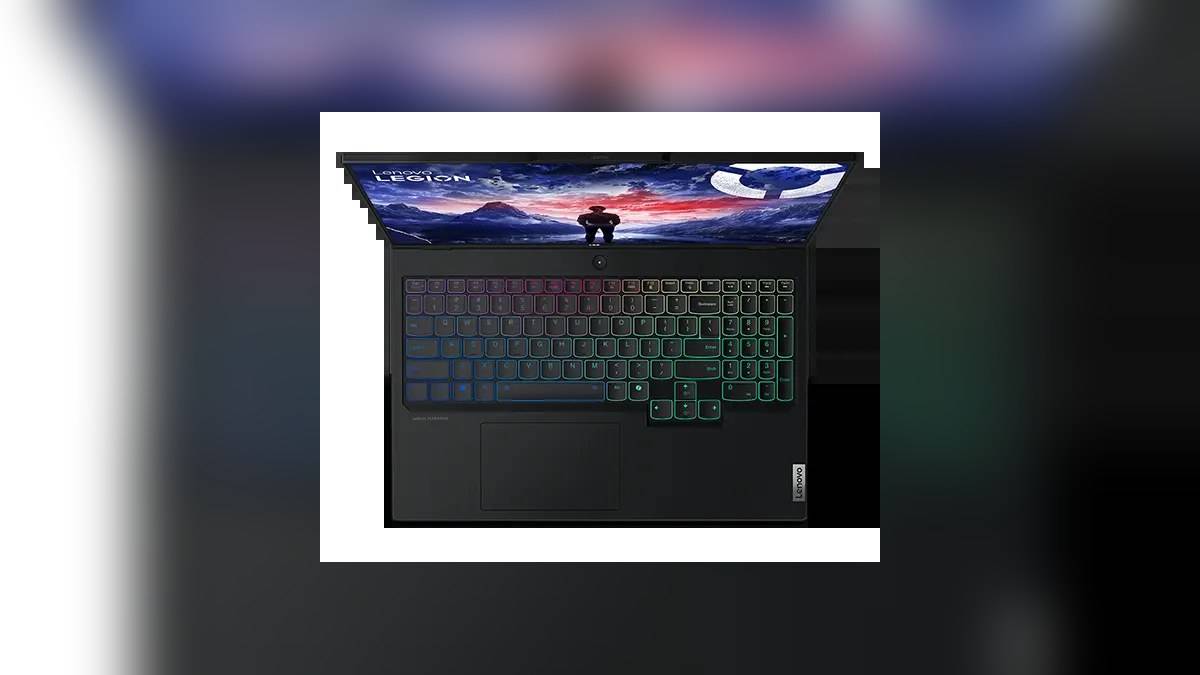
NEW DELHI: Lenovo lists the Legion Pro 7i Gen 9 configuration 83DE001HIN at Rs 3,25,990, including shipping and taxes. The verified India listing has a Core i9-14900HX processor, RTX 4080 Laptop GPU, 32GB memory and 1TB SSD. This is a guide to that specific configuration, with its screen, expansion and power requirements considered together.
| Priced variant | Legion Pro 7 16IRX9H, 83DE001HIN |
|---|---|
| Listed price | Rs 3,25,990 |
| Processor | Intel Core i9-14900HX |
| Graphics | NVIDIA GeForce RTX 4080 Laptop GPU, 12GB GDDR6 |
| Memory and storage | 32GB DDR5, two 16GB modules; 1TB SSD |
| Display | 16-inch 2560 x 1600 IPS, 240Hz, 500 nits, 100% DCI-P3 |
| Power | 99.9Wh battery; 330W adapter |
| Software and support | Windows 11 Home Single Language; Office Home & Student 2021; One Year Legion Ultimate Support |
Price as of 22 November 2026, 23:10 IST. Lenovo's official India store identifies this as the Eclipse Black configuration. The selected specification has a non-touch, anti-glare display, per-key RGB keyboard and Full HD camera with an electronic privacy shutter. It does not list a fingerprint reader.
Understand the GPU configuration
The official PSREF lists the RTX 4080 Laptop GPU at 175W TGP. It separately lists an RTX 4090 option for the family, but that is not the GPU in the priced SKU. No India price for the latter is established in this guide. A generic Legion photograph or family description should not blur that distinction.
For a demanding game or creative application, ask to see the intended workload on the actual configuration. A benchmark from a different GPU option is an unsuitable substitute. The useful questions are how the system behaves during sustained work, whether the fan profile is acceptable and whether the chosen settings deliver the experience you need.
Put the display and workspace together
The screen specification combines a larger working canvas with a fast refresh rate. Those characteristics serve different purposes. A dense editing interface benefits from room for controls and previews, while a fast-moving game raises questions about frame delivery and responsiveness. Neither use case can be judged from the processor name alone.
Try your own application layout at a comfortable text size. If you regularly use an external monitor, test that complete arrangement too. The internal panel may matter less to someone who closes the laptop at a desk than to someone who edits or plays on the built-in screen every day. Decide which arrangement represents normal use before comparing prices.
For colour-sensitive work, the stated gamut is a starting point for assessment. Ask how the display will be calibrated and how files will be checked on the intended output device. Broad colour coverage does not remove the need for a managed workflow, particularly when work will be printed or delivered to clients with different displays.
Expansion without guessing at empty slots
Lenovo's reference document lists two DDR5 SODIMM slots and two M.2 2280 storage slots. The India SKU already specifies its memory as a pair of modules. That makes checking the installed layout essential: a plan to increase capacity may involve replacing parts rather than simply adding a module to an empty socket.
Before buying an additional SSD, establish the required physical format, service procedure and backup plan. More internal space can make a large project or game library easier to manage, but it should not become the only home for important files. Keep a separate copy of work before any service operation that changes the storage configuration.
The charger is part of the daily kit
The PSREF shows Thunderbolt 4, USB-C, USB-A, HDMI and Ethernet connections. It also qualifies the advertised 140W USB-C power input: that figure requires Lenovo's specified adapter, and other adapters may supply less. The included full-power adapter and a travel USB-C charger should therefore be treated as different parts of the setup.
That is especially relevant when a laptop moves between rooms or offices. Test the complete desk layout with the intended monitor and peripherals, then decide which charger will remain at each location. Avoid assuming that a convenient USB-C connection will reproduce the same operating conditions as the supplied adapter during demanding work.
Who it is for, and the rival question
This configuration is best assessed by someone who can identify a demanding workload and needs to move that workload between locations. For routine browsing, document editing and video calls, its specialist hardware is a different proposition from a general-purpose office laptop. This guide establishes equipment and price, not a measured performance ranking.
The Lenovo Legion Tab at Rs 36,000: identify Gen 2 before comparing gaming tablets is relevant comparison reading. Also examine the Lenovo Idea Tab Plus vs Idea Tab price: Idea Tab starts lower at Rs 20,998 and How to read Lenovo Tab M9 listings at Rs 9,499 and Rs 11,999. Compare the exact GPU, screen, software and service arrangement against your work, rather than treating every premium laptop as interchangeable.
Official sources: Lenovo Legion PSREF and Lenovo India Legion listing and official Legion catalogue.