To use skills in Claude, enable the file-creation capability in Settings, then open Customize and Skills to turn on the skills you want. Anthropic's current help lists availability for Free, Pro, Max, Team and Enterprise users. A skill supplies a reusable method for a task, such as structuring a report or applying document rules, so you do not have to explain the same process in every conversation.
| Requirement | What to check |
|---|---|
| Individual account | File creation and code execution enabled |
| Skill library | Customize, then Skills |
| Managed account | Organisation settings and permissions |
| First useful test | A small task with a clear expected format |
What are Claude skills?
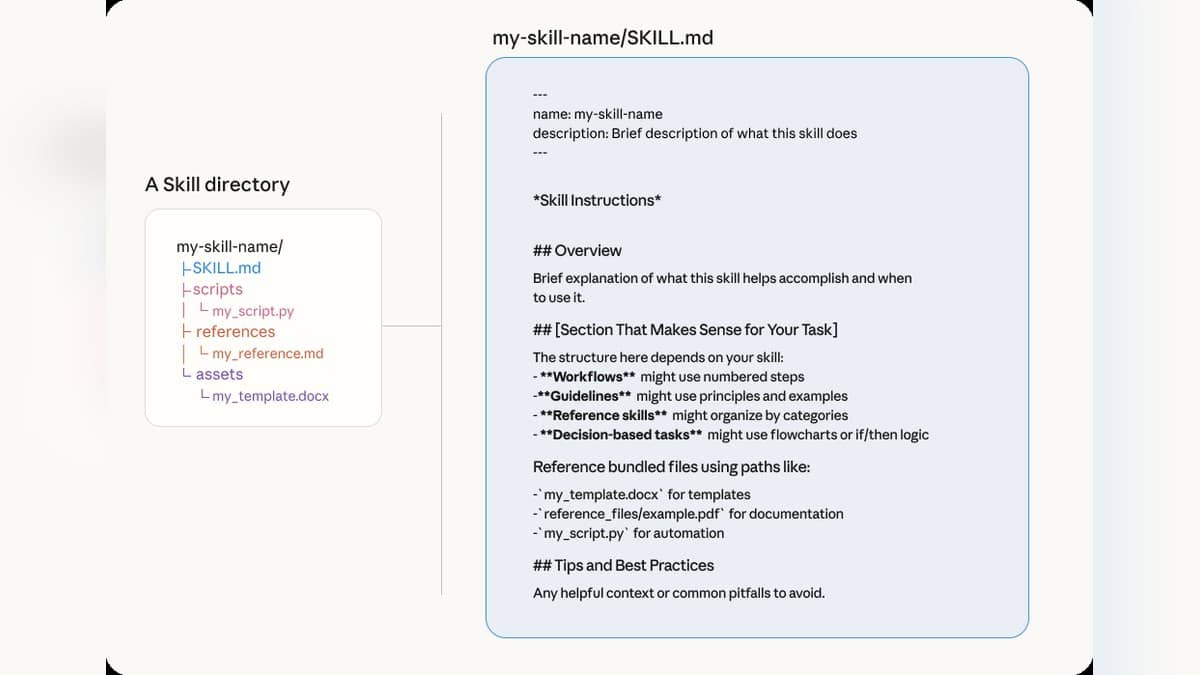
Anthropic's skills explanation describes packages of instructions, resources and, where needed, scripts. Claude checks which available skills are relevant to a request and brings in the corresponding material. A custom skill might encode the headings in a monthly report, the checks for a dataset or the structure of meeting notes.
The company distinguishes its own skills from custom skills created by users and skills provided by an organisation. Its built-in document capabilities cover Word, Excel, PowerPoint and PDF work. An organisation can distribute approved workflows to members. That distinction matters when deciding who maintains a method you depend on: a personal draft and an organisation's approved procedure are different sources of instructions.
A useful starting task is one for which you already know what a good result looks like. If every request needs a different structure, first work out the format in an ordinary conversation. Package it as a skill once you can describe the repeated steps and the conditions under which they should apply.
How to enable skills in Claude
The current user guide sends individual users to Settings and Capabilities. It names the prerequisite Code execution and file creation, while noting that the updated settings layout calls it Create and edit files. After enabling that capability, open the skill library and switch the relevant entries on.
For managed accounts, the guide directs attention to the organisation's Plugins and skills policy settings. Enterprise owners must enable the required capabilities; Team availability also depends on organisation settings. If the option is absent, identify the account and its administrator-controlled policy before following an older tutorial that assumes an individual account.
Once enabled, the built-in document skills can be selected automatically when relevant to a request. Specify the deliverable clearly, for example an editable Word report with a title and a table of decisions. Skill availability does not itself establish that the finished document is factually correct or ready to circulate.
How to create a custom skill without writing code
The Claude Academy conversation guide describes a route in which you explain your process and supply relevant examples or templates. Claude asks questions, organises the material and prepares a skill file. You can describe the workflow in ordinary language rather than starting with a programming project.
For a small office, an original starting prompt could be: Create a skill for turning my meeting notes into an internal action summary. Use four sections: decisions, tasks, unanswered questions and next meeting. Copy names and dates only when they appear in the notes. Mark missing owners as unassigned. Ask before treating a suggestion as a confirmed decision.
This prompt is designed to define a repeatable editorial task. It supplies a format and rules for missing information, but it does not promise that Claude will apply them perfectly. Add a short invented meeting note for the first trial so you can inspect the structure before using real operational material.
A second original prompt could be: Create a skill for checking a weekly project update against this template. List missing sections, identify dates that disagree within the document, and separate completed work from future plans. Do not add progress claims. Return a correction list before offering a rewritten version.
How do you test and improve a skill?
Anthropic's custom-skill guidance recommends a focused workflow with a clear description of when it should run. It also advises checking referenced files and trying multiple relevant prompts. The description is part of how Claude identifies the right skill, so a vague label deserves attention if the skill is not being selected.
Compare the result with your intended format. Check whether every source name survived, whether missing information stayed visibly missing and whether the output invented an owner or deadline. Then revise the instruction that failed. A test containing an incomplete note is useful because it exposes how the workflow handles uncertainty.
These steps were checked against official documentation on 26 October 2026; the sample prompts are original examples, not a claim of hands-on performance testing. For related coverage, read about Gemini's work agent, AI in legal education, and AI in teaching.