
Duck.ai does not use your conversations to train chat models, according to DuckDuckGo's official privacy guidance. You can also disable chat history in Duck.ai settings and delete saved conversations with the Fire Button inside Duck.ai. Those controls address different things: training use, saved history and shared links each need their own explanation.
For someone using AI to draft a job application or organise study notes, the practical question is where the conversation goes after the answer appears. DuckDuckGo distinguishes chats kept locally, optional encrypted backups and conversations deliberately shared with another person. Its help pages, checked on 28 November 2026 at 10:53 pm IST, explain what each choice changes.
| Question | Official position |
|---|---|
| Are chats used for training? | DuckDuckGo says neither it nor the underlying providers train on Duck.ai conversations. |
| Is history saved? | Locally by default, with an option to disable it. |
| Can chats be backed up? | Optional Sync & Backup uses encrypted server storage. |
| Can a shared link be removed? | Yes, but recipients may already have saved their own copies. |
How to turn off Duck.ai chat history
Open Duck.ai settings and disable chat history. DuckDuckGo's chat history help page says recent conversations normally appear in the sidebar and are saved on your device. Disabling that feature is a storage choice. There is no need to enable history to obtain the company's stated protection against model training.
Do not assume that changing a history preference removes every conversation already saved. Treat deletion as a separate task and inspect your existing list. The official page provides different controls for individual chats, selected chats and the full list, so you can choose the scope you actually intend.
How to delete Duck.ai chats and pinned conversations
For one conversation, use its Fire Button or open the three dot menu beside it and choose Delete Chat. To delete several, use the Fire Button at the top of the chats list, choose Selected Chats, select the conversations and confirm with the red Fire Button at the bottom of the screen.
To clear the list, use the Fire Button at the top and choose Delete Chats. Pinned conversations are an exception: DuckDuckGo says the bulk Fire Button action preserves them. Unpin those conversations first or delete them individually through their menus if you want them removed too.
There is another easily missed distinction. In the DuckDuckGo browser, clearing browser data with the browser's Fire Button does not delete Duck.ai conversations by default. Use the control inside Duck.ai for that task. Check the remaining list, particularly pinned entries, instead of judging success only by whether a browser window was cleared.
Does Duck.ai store chats or use them for training?
DuckDuckGo's privacy explanation says it removes identifying metadata, including an IP address, before sending a request to a model provider. It also says its agreements prohibit providers from training on Duck.ai conversations. These commitments apply to requests made through Duck.ai, rather than every separate service a model provider operates.
The same page describes exceptions and optional features. If you voluntarily include a conversation with feedback, DuckDuckGo can store and review it. It also describes anonymous analysis of how the service is used. A promise against training therefore should not be expanded into a claim that no processing of any kind occurs.
For retention details, consult the privacy information for the selected chat as well as the general policy. The Duck.ai terms distinguish provider protections and allow limited safety and legal exceptions. Avoid treating a short phrase such as private AI as a complete description of every provider's handling rules.
What changes with encrypted backups and shared links?
Sync & Backup is optional. It stores encrypted conversations on a DuckDuckGo server, with the master decryption key held on your devices. DuckDuckGo says it cannot read those chats. This differs from keeping history only locally, even though both are presented as private storage options.
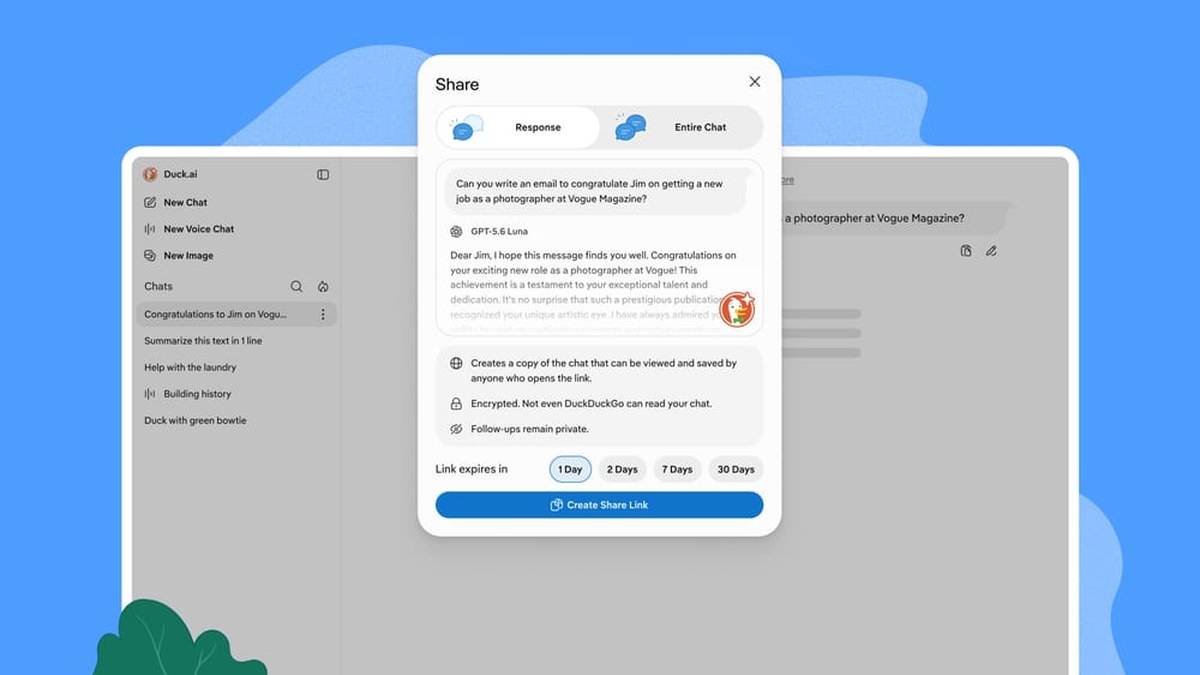
Sharing creates a different exposure. DuckDuckGo's official explanation of chat sharing says a shared conversation is encrypted before upload, and its decryption key is contained in the link. Anyone who obtains that link can read the conversation. Encryption does not make a link safe to circulate without checking what the conversation contains.
The default expiry is 48 hours, with options of 1, 2, 7 or 30 days. Review and delete links in Duck.ai Settings under Shared Chats. A person who saved the conversation before deletion keeps that copy, so revoking access cannot recall information already read or copied.
For other services, use our separate guides to ChatGPT training controls, Claude privacy settings and Perplexity data retention. Apply each service's own instructions rather than assuming one deletion action changes every AI account.