
To pay a court fee online through ePay, select the relevant court, choose a new or existing case, enter the payment details and complete the linked state payment process. Save the eChallan and its Government Reference Number, or GRN. The receipt is needed for the court to verify the payment; a bank debit alone does not complete every step of filing a case.
The National Informatics Centre maintains ePay under the guidance of the eCommittee of the Supreme Court of India. Its official description identifies litigants, citizens and legal professionals as users. Court fees, judicial deposits, fines and penalties are different payment purposes, so begin with the correct service.
| Task | What to have ready |
|---|---|
| New case payment | State, district, establishment, party name and verified fee amount |
| Existing case payment | CNR, case number or filing number |
| Receipt retrieval | Party name and the number used for payment |
| Payment problem | GRN, bank reference and transaction details |
How to pay court fees online for a new case
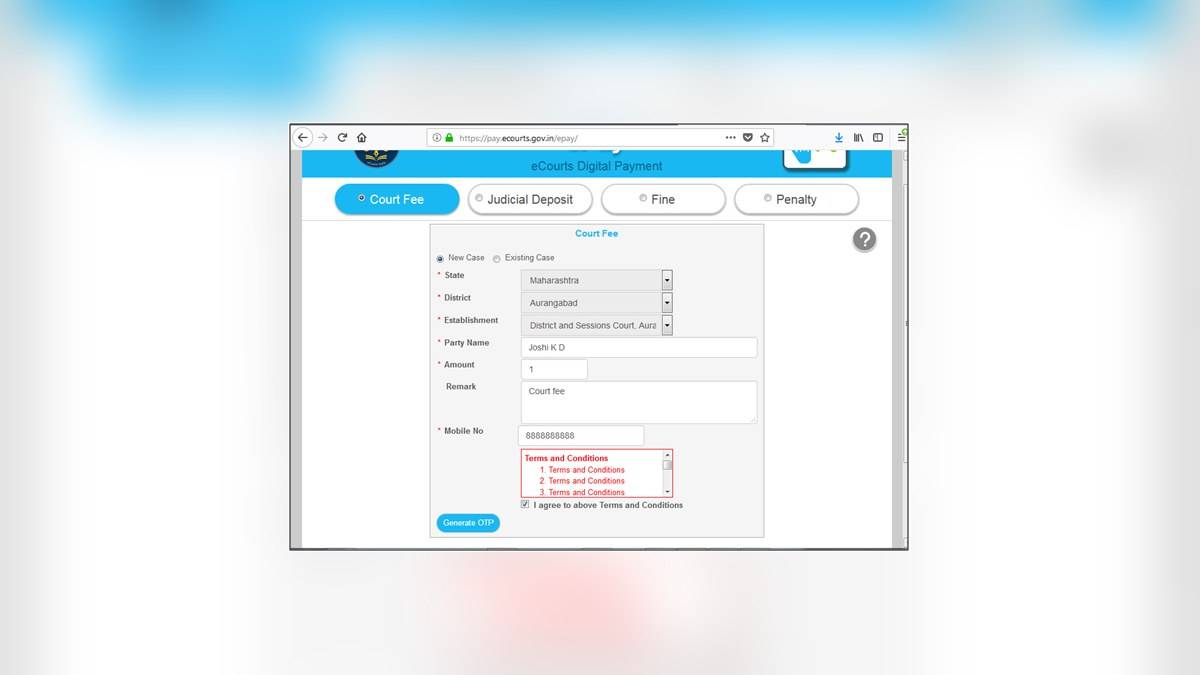
Open the official court fee payment page. It offers District Court and High Court choices, followed by New Case and Existing Case. For a new case, select the state, district and establishment required by the form. Check the establishment carefully: similarly named courts are not interchangeable payment destinations.
Enter the party name, court fee amount, remarks and contact number. Where the page offers a scheme or payment head, confirm the appropriate selection with the court registry. The form accepts an amount entered by the payer. Do not assume that entering a figure means the portal has calculated the legally payable fee for the particular claim.
Read and accept the terms before generating an OTP. The page's instructions say to enter it within two minutes and select Verify. They also allow regeneration after two minutes. Keep the number used for this transaction available because it is also part of the process for retrieving previous payments.
After verification, follow the linked state receipt portal. The published instructions illustrate GRAS, the Government Receipt Accounting System, and selection of a bank for internet banking. Record the GRN when it appears, continue to the bank and save the acknowledgement or eChallan after payment. Available routes depend on the state payment system presented for your court.
How to pay court fees for an existing case
Choose Existing Case when the payment belongs to a matter already on record. The official instructions provide three search routes: CNR, case number and filing number. With the case number route, select the case type and supply the number and year, then use Go. Confirm the returned case and party before entering the amount.
If you first need to identify your matter, our guide to Court: State vs A Nobody OTT platform, cast and Hindi audio explains the available search details. Use the identifier from the court record rather than guessing from a party's name. After the correct matter is located, the OTP, state payment and receipt steps follow the same broad sequence as a new case payment.
Court fee payment receipt download and failed transactions
Use View Previous Transactions to look up payments with the party name and number used for the transaction. The portal's help says the list includes successful and failed transactions. This is the first useful check when the bank shows a debit but you did not save a receipt.
The help describes a recovery sequence for an unsuccessful transaction where a GRN has not been generated. Get Challan Details fetches information from the state receipt system. Once those details are available, Get Bank Details fetches the bank information. View Challan then lets the user inspect the challan. Follow the options actually shown for the transaction rather than making a fresh payment immediately.
Keep the bank reference, amount, payment date, party name and any GRN together when seeking assistance. The terms direct users with payment issues to the relevant subordinate court, High Court or state Finance and Treasury Department. They do not specify one national refund completion time, so check the applicable refund policy and authority for your payment.
Does paying the fee mean the case is filed?
The official ePay manual says the litigant or advocate submits the challan to court with the case. Court staff verify and deface it in the Case Information System, preventing the same challan from being reused. Payment therefore needs to be matched with the court's filing requirements.
For the separate document submission process, see eCourts case status: CNR, party name and case number searches. If you need help understanding the required fee or preparing the case, check eFiling eCourts registration: litigant profile, documents and filing. ePay does not award financial assistance or decide eligibility for legal aid. The correct fee, any exemption and the filing deadline must be confirmed with the relevant court.