A CIBIL hard enquiry is a lender's check of your credit report while assessing a loan or credit card application. It can affect your score, particularly when several applications are made close together. Checking your own CIBIL score is different: CIBIL says this self-check does not lower it. If an enquiry appears that you cannot match to an application, review the lender name, date and purpose before deciding what to dispute.
| Check or record | What it means |
|---|---|
| Hard enquiry | A lender accesses your report for a credit application |
| Self-check | You review your own score, without lowering it |
| Enquiries section | Records lender checks during the previous 36 months |
| Accounts section | Records credit facilities and their repayment information |
Does a hard enquiry affect your CIBIL score?
CIBIL's official score explainer distinguishes soft enquiries, including checking your own score, from hard enquiries made by lenders. It says repeated credit applications over a short period can affect the score. The distinction matters when an alert arrives soon after you have reviewed your own report: your self-check and a lender's application assessment are different activities.
A hard enquiry is one part of the wider credit picture. CIBIL also identifies payment history, credit utilisation, length of credit history and credit mix among the factors used in scoring. A change in the final number cannot automatically be attributed entirely to the latest enquiry. Other information in the report needs to be considered alongside it.
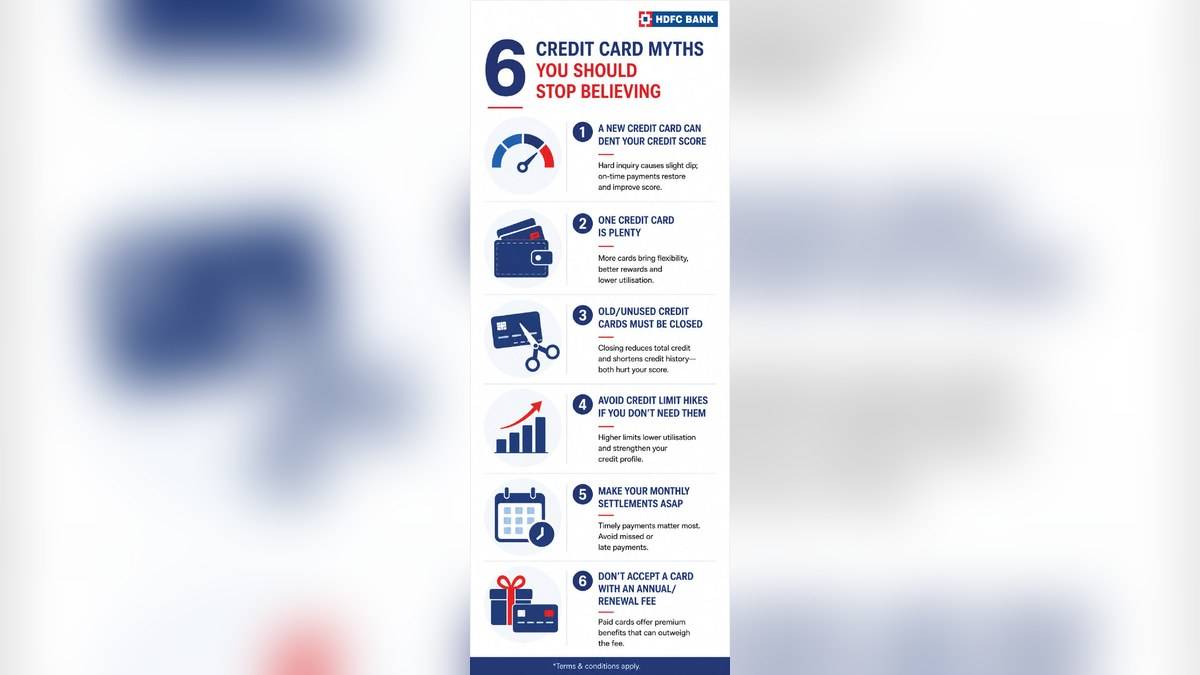
HDFC Bank's credit card myths explainer also says an application involves a hard inquiry and that multiple applications in a short period can have a noticeable impact. This supports the distinction between checking information and formally applying for more credit. It does not provide a personalised calculation for any particular borrower.
How to read the enquiries section of a CIBIL report
CIBIL's walk-through of Accounts and Enquiries says the enquiries section records lender checks made while processing applications during the last 36 months. Entries typically show the lender, enquiry date and credit type. Read those fields together; a lender name alone gives less context than the name matched with a date and application purpose.
For example, someone who applied for a personal loan should compare the report entry with that application record. Someone who only reviewed their own score should look separately for any lender application they made around that time. These examples illustrate how to reconcile records; they do not predict whether a particular application will be accepted or how much a score will change.
The Accounts section answers another question: what borrowing is recorded? CIBIL says it includes active and closed facilities, lender details, balances and repayment history. An enquiry entry is a record of access to the report. To understand whether a credit facility is also recorded, examine the corresponding account information instead of treating the enquiry list as an outstanding debt statement.
What is an ECN in a CIBIL enquiry alert?
The CIBIL Consumer Enquiry page defines ECN as Enquiry Control Number, a unique reference of nine to ten digits generated when a lender checks the score. It separately describes enquiry purpose as the type of credit requested, and enquiry date and time as when the lender requested the credit history and score.
Keep those details together if you need an explanation. The ECN identifies the check; the purpose describes the product involved. Neither field substitutes for the repayment record in an account entry. Recording the precise reference is more useful for a specific query than sending only a screenshot of the overall score.
Can you remove an enquiry you do not recognise?
CIBIL directs consumers who do not recognise an enquiry to contact the lender and raise a dispute with CIBIL. Its Contact Us FAQs say enquiry inaccuracies and duplicate enquiry information can be disputed. A request for verification should explain what is wrong, such as an application that does not belong to you or an entry believed to be duplicated.
The same FAQs explain that CIBIL cannot delete or modify information in a credit report without written confirmation from the relevant credit institution. Raising a dispute therefore initiates a check of the reported information. It does not mean every genuine enquiry can be removed merely because the applicant would prefer it absent.
CIBIL describes a route through the Credit Reports section of myCIBIL, then the dispute centre and the relevant report section. Retain the dispute ID and confirmation for tracking. For the separate rules on correction timelines, read credit report correction and RBI compensation.
Does checking your own report create another hard enquiry?
CIBIL explicitly says reviewing your own report will not affect your score and offers one free score and report each calendar year. Our free annual CIBIL report guide explains that access separately. The immediate task after an unfamiliar enquiry is to compare the entry with your records and seek verification where needed.
Keep different report problems separate. An enquiry concerns a lender's access; utilisation concerns credit already used, explained in our credit utilisation ratio guide. Identifying which section contains the issue helps you describe the problem accurately without assuming that every score movement has the same cause.