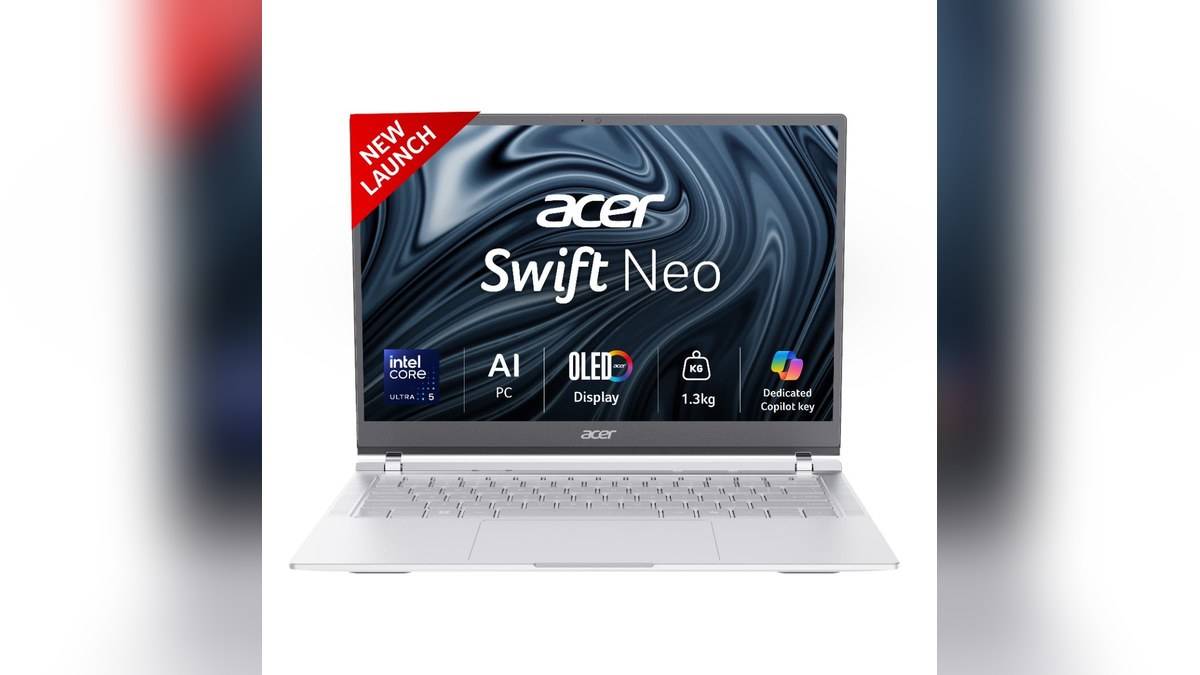
NEW DELHI: Acer's India store lists the Swift Neo SFN14-54H, reference UN.35GSI.007, at Rs 81,499 for the silver Core Ultra 5 115U configuration with 16GB memory and a 1TB SSD. This is the price displayed on the opened product page, without subtracting a bank benefit or adding accessories. The practical question is how its storage-heavy configuration fits a portable Windows workstation.
| Swift Neo configuration | Official listing |
|---|---|
| Reference | UN.35GSI.007 |
| Listed selling price | Rs 81,499 |
| Processor | Intel Core Ultra 5 115U |
| Memory and storage | 16GB onboard LPDDR5, 1TB PCIe Gen4 NVMe SSD |
| Screen | 14-inch, 1920 x 1200, OLED as described by Acer |
| Operating system | Windows 11 Home |
| Weight | 1.3kg |
Price as of 17 November 2026, 00:11 IST. The table covers the exact reference read for this guide, rather than presenting a complete Swift Neo family price list. Similar names on other listings should not be treated as interchangeable configurations.
A portable machine with room for local files
The combination puts the emphasis on carrying a substantial local working library. A student moving between a hostel and classroom might want downloaded lecture material available without relying on campus connectivity. A travelling professional might instead keep project documents and presentation assets together. Those are plausible uses for the configuration, not claims that it has been benchmarked with either workload.
Storage capacity and working memory also answer different questions. Space for a document archive does not automatically provide extra headroom for a demanding application. The onboard memory specification deserves particular attention if the intended workload includes large datasets or several development tools. Treat the listed memory as the configuration being purchased; do not assume that an inexpensive memory upgrade can be added later.
The display changes the working layout
Acer describes the panel with a 16:10 aspect ratio, 400-nit brightness and full sRGB coverage. The taller layout is useful context for a compact notebook: reading a long document while keeping its toolbar visible is a different requirement from watching widescreen video. It is the shape of the workspace, as much as the laptop's diagonal size, that should guide expectations.
The colour specification is a manufacturer claim, not a calibration report from this desk. Anyone preparing colour-sensitive deliverables should still distinguish a published gamut figure from proof of accuracy in a particular application. Nor does the OLED description establish that every similarly named Swift Neo has the same panel. The reference number remains the reliable way to identify this listing. Match that reference across the quotation and invoice so a different screen option is not mistaken for the same machine.
Windows features need their own checks
Acer's detailed table marks this reference as not being a Copilot+ PC. That distinction matters when comparing AI-labelled notebooks: a processor brand and an AI-related keyboard shortcut do not establish eligibility for every Windows feature. Microsoft's official requirements distinguish ordinary Windows PCs from machines that meet the additional Copilot+ hardware conditions.
Microsoft also says Windows Home needs internet access and a Microsoft account during initial setup. Plan that first start before leaving for a journey or a class. Feature availability can depend on hardware, software and region, so a desired Windows capability should be checked directly rather than inferred from the presence of the operating system.
Connections and everyday use
The Acer specification identifies HDMI, USB connections including Thunderbolt 4, a backlit keyboard and a Full HD webcam. These give a starting point for planning a desk setup with an external display and peripherals. Before committing to a particular dock, check the dock's requirements against the actual port specification. A connector's shape alone is insufficient evidence for every advertised docking function.
A useful assessment separates travel convenience from workload performance. Carrying the notebook, reading on its built-in screen and plugging into a desk are distinct parts of the experience. This guide reports specifications rather than measured thermals, fan noise or sustained application speed, so those qualities remain outside its findings.
Where it sits among alternatives
For a different portability balance, see our Acer Aspire 15 AS15-39 price list: Rs 39,999 to Rs 52,999. The Acer Nitro XV272U X1 vs VG270 X1 price: VG270 X1 starts lower at Rs 10,999 provides another compact Windows reference, while our Acer Swift Air 14 price: Rs 94,999 for two Core 5 colours shows why after-sales procedures belong in a wider comparison.
Compare the exact included software, memory arrangement and display before treating a rival's headline price as an equivalent offer. This Swift Neo's defining combination is its local storage allocation in a portable chassis. Whether that is useful depends on what needs to travel with its owner, not simply on the size of the discount printed beside the price.
Official sources: Acer India product listing and Microsoft Windows requirements.